


Verified review
Common Ninja has amazing no-code widgets that would beautify a website built on any builder. It is very easy to use and customise. It has as many widgets for almost everyone willing to make their website impressive.
Try the editor, no signup
Pick a template, customize it, and watch it update live, no signup.
No credit card · Free forever plan
No credit card · Free forever plan
The Common Ninja Countdown Bar widget is a free, no-code embed that puts a sticky countdown timer at the top or bottom of your website to create urgency around a sale, launch, or deadline.
Set the target date and time, pick a layout (top bar, bottom bar, floating strip), configure the days / hours / minutes / seconds display, enable sticky positioning that scrolls with the visitor, customize the design with skins or Custom CSS, and paste a one-line embed snippet on Google Sites, Notion, Showit, Shopify, Squarespace, Webflow, WordPress, and 200+ other platforms.
Use it to drive conversions during flash sales, launch waitlists, registration deadlines, holiday promotions, and any window where urgency is the right lever, sitewide, on demand, without a separate plugin per page.
A countdown bar at the top of the viewport stays visible no matter which page a visitor lands on. A flash sale, a launch deadline, a registration cutoff. Every page surfaces the same urgency signal without a separate embed per template. Visitors feel the deadline whether they entered through the homepage, a product page, or a blog post.
Set the expiration behavior in the editor. When the countdown hits zero, the bar can hide itself (no "expired" relic on the page), show a final message ("Sale ended, sign up to hear about the next one"), or redirect to a follow-up URL. Avoid the awkward "this offer expired three months ago" pattern that lingers when an embed isn't time-aware.
Visitors scroll past most page content within seconds. A top-of-page countdown that disappears on scroll loses its job after the first viewport. Sticky scroll keeps the bar anchored to the viewport edge so the deadline stays present through every section, every product card, every checkout step.
An inline countdown is a section element. Visitors see it when they scroll to that block of the page, then move on. A countdown bar is a viewport-anchored strip that follows the visitor through the entire page. Use this Countdown Bar for sitewide urgency strips; use the Common Ninja Countdown widget when the timer should live inside a specific section (a launch hero, an event block, a product card).
Enter the date and time when the timer should hit zero. A sale end, a launch hour, a registration cutoff, a webinar start. Set the timezone so the countdown respects each visitor's clock or fires globally at a fixed moment. Configure what the bar should do when the timer expires (hide automatically, show a final message, redirect to a URL).
Choose a layout: top bar (sticks to viewport top), bottom bar (sticks to viewport bottom), or floating strip (anchored to a section). Configure which time units display (days / hours / minutes / seconds. Show all four, or just the most relevant), add a headline and CTA button, set sticky-on-scroll behavior, and pick a skin from the design library or layer Custom CSS for pixel-level brand match.
Copy the one-line embed snippet and paste it on Google Sites, Shopify, Squarespace, Notion, Showit, Webflow, WordPress, or any of the 200+ supported platforms. The bar loads with the page and sticks to the viewport edge. Edits in the Common Ninja editor push to every embed without re-paste.
Pre-designed skins covering common urgency tones: neon-flash for high-energy launches, soft-pastel for membership renewals, dark-luxe for premium product drops, holiday-themed for seasonal sales. Each skin is a fully styled starting point; tune typography, accent colors, and timer-digit styling from there.
Pin the bar to the top of the viewport or the bottom. It stays visible as the visitor scrolls. Sticky position works across mobile, tablet, and desktop without recoding the placement. Configure margin and offset so the bar doesn't collide with your site's existing navigation.
When the countdown reaches zero, configure what happens next. Hide the bar entirely (clean default), show a final message ("Sale ended"), redirect to a follow-up URL, or restart with a new target date. No stale countdowns lingering on your site after a sale ends.
Layer Custom CSS over any skin to control digit typography, bar height, accent gradients, border-radius, button styling, and hover states. Tight integration with your site's design system without rebuilding the widget from scratch.
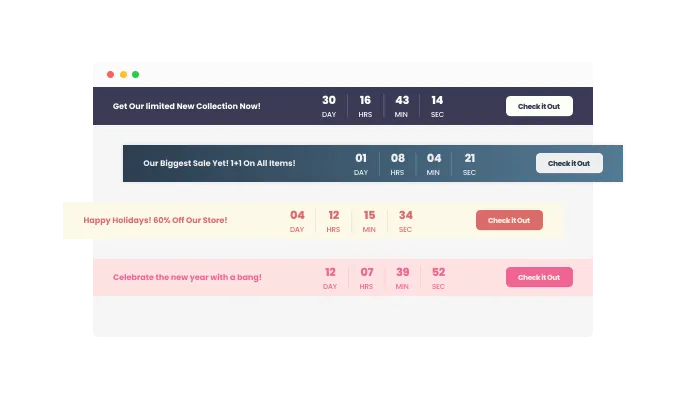
The Countdown Bar widget features a beautiful selection of 20 skins including thematic and seasonal skins that you can use for those holiday promotions, Black Friday promotions, Cyber Monday promotions and other, similar, seasonal promotions.
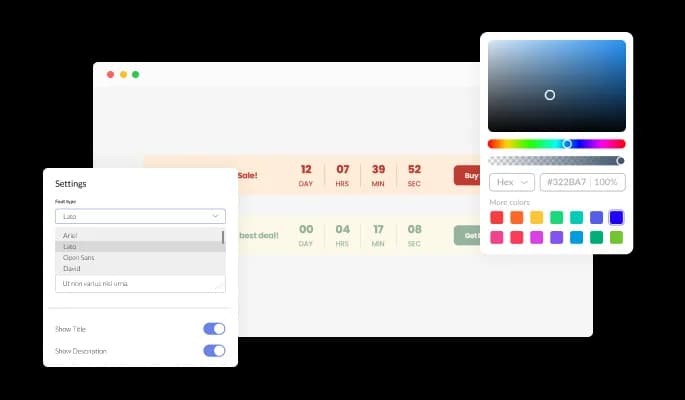
The Countdown Bar widget features full customization options so you can edit the design to fit your needs. Change the colors, the fonts, the spacing and anything else!
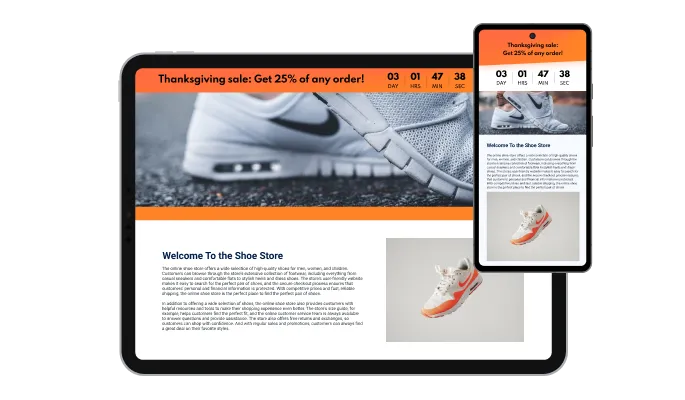
The Countdown Bar is fully responsive and will look great on any device. In a mobile-first world, this feature will put you ahead of your competitors.

As with all of Common Ninja’s widgets, you can add custom CSS to customize the Countdown Bar widget and be even more creative.

You can embed the Countdown Bar widget on your website easily by copying a single line of code. The widget will also be updated automatically with every change you make.
The Countdown Bar widget features optional automation that allows you to set the timer to disappear after completion to not confuse new visitors.
The Countdown Bar features a sticky timer that will stay in a fixed position regardless of how far down the page you scroll.
The Countdown Bar widget is easy to use and requires no coding knowledge. Our intuitive dashboard with the drag-and-drop feature will enable you to customize the widget any way you’d like to with just a few simple clicks.
Common Ninja has amazing no-code widgets that would beautify a website built on any builder. It is very easy to use and customise. It has as many widgets for almost everyone willing to make their website impressive.
Outstanding service. I use their widgets to help me with my web design business and whenever I need help they are very quick to help.
Excellent company with excellent service!!! We used it to build a survey, it was very user friendly. The service was perfect. Amit helped us with every problem and question we had, thank you very much!!!
Common Ninja saved the day when building our website and the customer service Daniel, the co-founder and CEO, provided was amazing.
Yes. The free plan covers one Countdown Bar with no time limit and no credit card. Upgrade only when you need additional bars, advanced expiration behaviors (auto-restart, redirect-on-expire), premium skins, scheduled countdowns, or features like A/B variants and per-bar analytics.
A Countdown Bar is a viewport-anchored strip (top or bottom of the page) that sticks to the visitor's screen as they scroll. It surfaces sitewide urgency: flash sales, launch waitlists, registration deadlines, visible no matter where on the page the visitor lands. The Countdown widget is an inline countdown unit that lives inside a page section (a launch hero, an event block, a product card). Use this Countdown Bar for sitewide deadlines; use the Common Ninja Countdown widget when the timer should live inside a specific block.
Configurable. Default: the bar hides itself so visitors don't see an expired countdown sitting on the page. Optional behaviors: show a final message ("Sale ended: join the waitlist for the next one"), redirect visitors to a follow-up URL, or auto-restart with a new target date. Set this in the editor, no code or extra plugin required.
Yes. When you enable sticky positioning. The bar pins to the top or bottom of the viewport and follows visitors through the entire page, keeping the deadline present from hero to footer. Configure margin and offset so the bar doesn't collide with your existing navigation. Disable sticky if you want the bar to be a top-anchored intro element that scrolls away with the page.
Yes. Configure which units render. Show all four (days, hours, minutes, seconds) for high-urgency final-hour sales, or just days and hours for a multi-day campaign. Hiding seconds keeps the bar from looking frantic during long countdowns; showing seconds amplifies last-minute urgency.
Build the widget in the Common Ninja editor (set target time, pick layout, customize skin), copy the embed snippet, and paste it into your site: Shopify via the Custom HTML section in your theme editor (or via a Custom Code app for sitewide injection); Squarespace via a Code Injection block in Settings → Advanced → Code Injection (for sitewide) or a Code Block on a specific page; Google Sites via Insert → Embed → Embed code. Edits in the editor push to every embed without re-paste.
Configurable. Set the countdown to fire at a global moment (e.g. "Sale ends at 2026-12-25 23:59 UTC"). Every visitor worldwide sees the same time-to-zero. Or set the countdown per-visitor timezone (e.g. "24 hours from when you arrived"). Useful for first-visit promos and waitlist countdowns where urgency should feel personal.
Yes. Layouts adapt across mobile, tablet, and desktop breakpoints. Bar height scales to viewport, timer digits resize to stay readable on narrow screens, and sticky positioning works on every modern mobile browser. The bar respects iOS Safe Area insets so it doesn't collide with the notch or the home-bar gesture area.
Pick your platform. Each takes under 4 minutes.
Displays a timer counting down to a specific date or event

Easily craft engaging, personalized popups to boost conversions.

A dynamic display that showcases brief news snippets or updates through continuous scrolling

Asks users to confirm their age before accessing restricted content
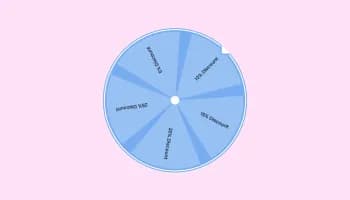
Interactive wheel offering rewards to boost user engagement, gather leads and increase conversions.
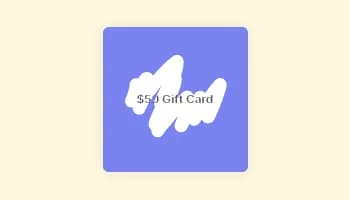
Interactive Scratch Card for users to unveil prizes, aiding lead generation.
Yes, you can easily change the widget's timezone via the “Content” tab on the widget’s dashboard.
Yes, we offer a beautiful selection of seasonal and holiday skins that you can use.
Yes, you can! The widget features full RTL support.
Yes, you can set that bar to disappear when the sale ends, so as not to confuse your users.
Yes, you can make the countdown sticky, so it will follow the users, regardless of how far they scroll.
Using the Countdown Bar widget is very easy. Simply sign up and start using the free version. There's no need to worry about complicated setup or installation processes, as the Countdown Bar widget is designed to be user-friendly and straightforward. Once you've signed up, you'll have access to all of the basic features and functions of the widget, which you can use to enhance your website and improve your online presence. From there, you can choose to upgrade to the paid version if you want to access more advanced features and capabilities. Regardless of which version you choose, you'll find that the widget is a powerful and easy-to-use tool that can help you take your online presence to the next level.
The Common Ninja Countdown Bar widget is a free tool reach with features and options. While this widget is free to use, it does have a limit on the number of views it can handle. This means that after a certain number of views, the chat button may no longer be visible or functional on your website. It is important to note that this view limit may vary depending on the plan you are using. Despite this limitation, Common Ninja's Countdown Bar is still a valuable tool for businesses looking to increase customer engagement and improve the overall user experience of their website.
The Common Ninja's Countdown Bar widget is a versatile tool for any website builder. This means that you can easily add this widget to your website or store no matter what platform you use to build your website. The Countdown Bar widget will work seamlessly with your platform, whether you are using a popular website builder or something more specialized. This means you can enjoy all the benefits of this powerful tool without having to worry about compatibility issues.
It’s very easy to embed Common Ninja’s Countdown Bar widget on your website and the process consists of two steps:
The Countdown Bar widget is designed to comply with the General Data Protection Regulation (GDPR), a set of EU regulations protecting personal data and privacy. When using the Countdown Bar widget, you can be confident that it will not collect or store personal data that could violate GDPR regulations. This ensures that your business is in compliance with these regulations and can protect your customers' data privacy. Overall, the Countdown Bar widget is a secure and reliable tool that can be used to enhance your website without any concerns about GDPR compliance.
No need for coding skills. Our Countdown Bar widget is designed to be easy to use, even for those with limited technical experience. The widget features a user-friendly interface that allows you to easily customize the widget without coding knowledge. You can fully customize the Countdown Bar to match your branding. When you're done, simply copy the provided code and paste it into your website. It's that simple!
Embedding the Countdown Bar widget on your website is a straightforward process. Simply copy the provided code and paste it into the desired location on your website. The widget will seamlessly integrate into your site, allowing you to take advantage of its features and functions. No technical expertise or programming knowledge is required - just copy and paste the code to get started. This simple process allows you to easily add the widget to your website and enhance its functionality without any hassle.
Yes. We are eager to hear your request. Please refer to this page.
A countdown bar widget is a user-interface element that displays a progress bar that counts down from a specified time or date to zero. It is often used to create a sense of urgency or anticipation, and it is commonly used on websites or applications to count down to a specific event or deadline. A countdown bar widget typically includes a visual representation of the time remaining, such as a horizontal or circular progress bar and a digital or text-based timer showing the exact time remaining. The widget may also include additional features, such as the ability to customize the appearance and style of the progress bar or display multiple countdown bars at once. Overall, a countdown bar widget can be a useful and engaging way to create a sense of urgency and anticipation on a website or application.
A countdown bar, also known as a countdown timer, is a tool that displays the amount of time remaining until a particular event or deadline. This type of widget can be used to create a sense of urgency and encourage visitors to take action on your website.
To use a countdown bar to boost sales on your website, you can:
Drive urgency with a sticky countdown bar at the top or bottom of every page, configurable target date and timezone, days / hours / minutes / seconds display, auto-hide or redirect on expiration, 20+ skins, and Custom CSS. Embed on 200+ platforms including Google Sites, Shopify, Squarespace, Notion, Showit, Webflow, and WordPress.
Create your Countdown BarNo credit card · Setup in under 5 minutes