Testimonials Slider for BaseKit

Add a testimonials slider to your site to showcase real customer feedback, build credibility, and increase trust that leads to higher conversions.

Create Testimonials Widget

loved by 500K+ businesses

BaseKit
plugineditor

Why Should You Use the Testimonials Slider Widget+?

Improve Credibility with testimonials for BaseKit

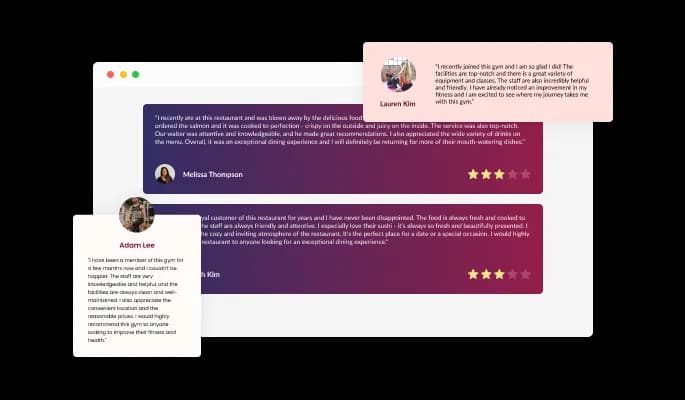
Enhance your credibility by placing a stellar testimonials slider on your BaseKit website. Write compelling testimonials, add stars and make sure that your users are enthralled by what they read!

Enhance the design of your BaseKit website

You can customize the testimonials carousel for BaseKit so that they enhance the overall style of your BaseKit website page and complement it, or, on the contrary, contrast it. Choose what's right for you!

Offline reviews and testimonials for BaseKit can be added

Share your offline reviews online! You may receive praise via emails, instant messaging platforms, or other means that are not easily accessible online. Share the praise you've received on your BaseKit website by copying the text into the Testimonials Slider Widget!

Unique Testimonials Layouts

There are three different layout styles included with the Testimonials carousel for BaseKit, each of which rearranges the elements within the testimonials and creates a different style that can be used to enhance your BaseKit website's design. You can further customize the layouts by enabling the "Stretch Height" option, which will allow all testimonials to have the same height as the tallest one. This creates a uniform, unified look for the layouts.

Testimonials Slider - Unique Testimonials Layouts

Selection of colorful skins for your BaseKit website

With so many beautiful skins to choose from for your BaseKit website, you can customize the BaseKit Testimonials slider widget. In addition to complementing most design color schemes, these skins will enable you to create a beautiful Testimonials slider quickly and effortlessly for your BaseKit website.

Testimonials Slider - Selection of colorful skins for your BaseKit website

Easily customizable widget

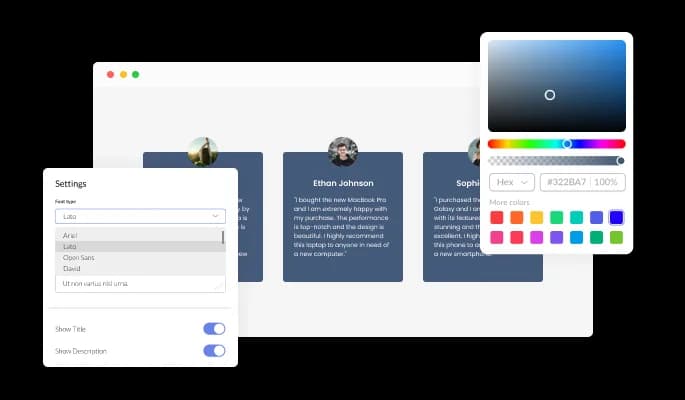
With the Testimonials slider widget for BaseKit, you can fully customize the design to meet the needs of your BaseKit website. You can customize everything from the colors to the fonts to the spacing!

Testimonials Slider - Easily customizable widget
Testimonials Slider - Enhanced Testimonials slider Control Options

Enhanced Testimonials slider Control Options

You can enhance the user's experience by adding control elements like arrows and pagination to the Testimonials slider for BaseKit on your BaseKit website. A "fade edge" effect can be added to the background and arrow containers to further enhance the customization of these elements.

Testimonials Slider - A variety of BaseKit [app_nae] icons

A variety of BaseKit [app_nae] icons

Testimonials widget for BaseKit includes a lovely set of arrow icons that you can choose from. This selection of icons can be further wrapped in several different container types to ensure that the Testimonials widget fits your BaseKit website’s design needs.

Testimonials Slider - RTL Content Support

RTL Content Support

Testimonials slider widget for BaseKit supports right-to-left writing. More users will be able to access your news on your BaseKit website.

Testimonials Slider - An Easy To Use Testimonials slider widget

An Easy To Use Testimonials slider widget

Testimonials slider for BaseKit do not require any coding knowledge. The intuitive dashboard with drag-and-drop functionality will allow you to customize the widget in any way you'd like with just a few clicks.

Totally Responsive for your BaseKit website

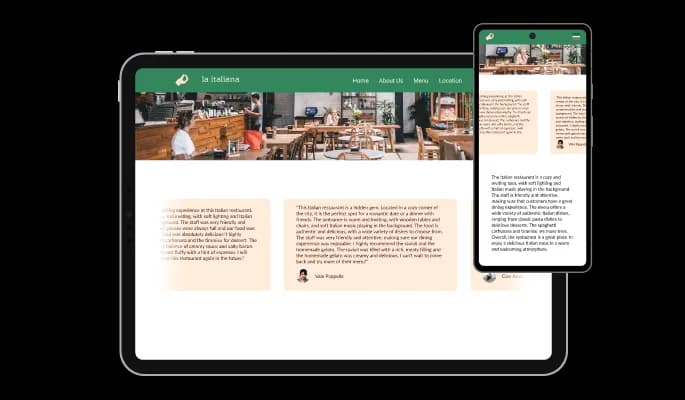
We have designed the Testimonials slider widget for BaseKit to be fully responsive, so it will look great on any device. In addition to having a clean and contemporary design that will improve the overall appearance of your BaseKit website, it is fully responsive, meaning it will adjust flawlessly to fit the screen size of any device. It is essential to have a website that is optimized for mobile viewing in a world where more and more people are using their phones and tablets to access the internet. You can accomplish this and gain an advantage over rivals with the Testimonials slider widget.

Testimonials Slider - Totally Responsive for your BaseKit website

Custom CSS with Testimonials slider for BaseKit

Custom CSS can be used to further customize Testimonials slider for BaseKit in Common Ninja as well. This feature makes it simple to change the colors, fonts, layout, and positioning of every element that makes up the widget's visual identity. But, you can enhance your customization by manually altering the CSS if you're feeling really inventive. This enables you to customize the Testimonials slider widget by making even more sophisticated adjustments. Our advanced editor contains everything you need, whether you only want to make a few minor adjustments or go completely wild with customizations.

Testimonials Slider - Custom CSS with Testimonials slider for BaseKit

Simple to Embed On Your BaseKit website

Embedding your Testimonials slider widget on your BaseKit website is as simple as copying and pasting one line of code. Additionally, the BaseKit Testimonials slider will be updated automatically on your BaseKit website if any changes are made.

Testimonials Slider - Simple to Embed On Your BaseKit website

Compatible With All Site Builders, E-Commerce Platforms and Websites

webflow logoshopify logowix logowordpress logobigcommerce logosqurespace logoweebly logojoomla logoduda logojimdo logomagento logoshift4hsop logounbounce logocarrd logo
View all supported platforms

FAQ

Yes, you can do so by using selecting the review you’d like to change the rating in, and moving the rating slider to the desired result. 

Yes, you can do so from within the “Look & Feel” tab.

Yes, you can do so from within the “Look & Feel” tab.

Yes, you can do so from within the “Look & Feel” tab.

Yes, you can do so from within the “Look & Feel” tab.

Yes, you can do so from within the “Look & Feel” tab.

Yes, you can do so from within the “Look & Feel” tab.

Yes, you can do so from within the “Look & Feel” tab.

Yes, you can do so from within the “Look & Feel” tab.

Yes, you can do so from within the “Look & Feel” tab.

Yes, you can do so from within the “Settings” tab.

Yes, you can do so from within the “Settings” tab.

Yes, you can do so from within the “Settings” tab.

Can I change the Testimonial’s carousel speed?

Using the Testimonials Slider widget is very easy. Simply sign up and start using the free version. There's no need to worry about complicated setup or installation processes, as the Testimonials Slider widget is designed to be user-friendly and straightforward. Once you've signed up, you'll have access to all of the basic features and functions of the widget, which you can use to enhance your website and improve your online presence. From there, you can choose to upgrade to the paid version if you want to access more advanced features and capabilities. Regardless of which version you choose, you'll find that the widget is a powerful and easy-to-use tool that can help you take your online presence to the next level.

The Common Ninja Testimonials Slider widget is a free tool reach with features and options. While this widget is free to use, it does have a limit on the number of views it can handle. This means that after a certain number of views, the chat button may no longer be visible or functional on your website. It is important to note that this view limit may vary depending on your plan. Despite this limitation, Common Ninja's Testimonials Slider is still a valuable tool for businesses looking to increase customer engagement and improve the overall user experience of their website.

The Common Ninja's Testimonials Slider widget is a versatile tool for any website builder. This means that you can easily add this widget to your website or store no matter what platform you use to build your website. Whether you are using a popular website builder or something more specialized, the Testimonials Slider widget will work seamlessly with your platform. This means you can enjoy all the benefits of this powerful tool without having to worry about compatibility issues.

It’s very easy to embed Common Ninja’s Testimonials widget on your website and the process consists of two steps:


  1. Once you’ve finished working with the Testimonials widget, copy the HTML text that can be found under the 'Add to Website' tab on the app’s dashboard.
  2. On your website builder, find the 'embed' widget option, place it where you want the Testimonials widget to appear, and then paste the HTML code you’ve copied before into the widget.

The Testimonials Slider widget is designed to comply with the General Data Protection Regulation (GDPR), a set of EU regulations protecting personal data and privacy. When using the Testimonials Slider widget, you can be confident that it will not collect or store personal data that could violate GDPR regulations. This ensures that your business is in compliance with these regulations and can protect your customers' data privacy. Overall, the Testimonials Slider widget is a secure and reliable tool that can be used to enhance your website without any concerns about GDPR compliance.

No need for coding skills. Our Testimonials Slider widget is designed to be easy to use, even for those with limited technical experience. The widget features a user-friendly interface that allows you to easily customize the widget without coding knowledge. You can fully customize the Testimonials Slider to match your branding. When you're done, simply copy the provided code and paste it into your website. It's that simple!

Embedding the Testimonials Slider widget on your website is a straightforward process. Simply copy the provided code and paste it into the desired location on your website. The widget will seamlessly integrate into your site, allowing you to take advantage of its features and functions. No technical expertise or programming knowledge is required - just copy and paste the code to get started. This simple process allows you to easily add the widget to your website and enhance its functionality without any hassle.

Yes. We are eager to hear your request. Please refer to this page.

Displaying testimonials on your website can have several benefits, including:

  1. Increased credibility: Testimonials from satisfied customers can help increase the credibility of your business and the products or services you offer. Seeing positive reviews from real people can help potential customers feel more confident in their decision to do business with you.
  2. Improved trust: Testimonials can help establish trust with potential customers by providing evidence that your business is reliable and provides a good customer experience.
  3. Enhanced social proof: Testimonials can show potential customers that other people have had positive experiences with your business. This can help increase the perceived value of your products or services and encourage more people to buy.
  4. Increased conversions: By providing positive reviews and testimonials, you can increase the likelihood that potential customers will convert into paying customers.
  5. Greater customer satisfaction: Testimonials can also help improve the overall satisfaction of your customers by providing them with a platform to share their positive experiences with others. This can help create a sense of community and encourage customers to continue doing business with you.


Displaying testimonials on your website can help increase your business's credibility, trust, and perceived value, which can lead to increased conversions and customer satisfaction.

Social proof, also known as informational social influence, is a psychological phenomenon in which people look to the actions and behaviors of others to guide their own decisions and behaviors. It is based on the idea that people are more likely to trust and follow the actions of others, especially when they perceive those others to be similar to themselves or to be experts in a particular field.


In the context of marketing and branding, social proof can influence potential customers' decisions by showing them that other people have had positive experiences with a product or service. This can be achieved through various means, such as displaying customer reviews, testimonials, social media followers, or other metrics that demonstrate the popularity or success of a product or service.


Using social proof can be an effective way to increase the perceived value of a product or service and to encourage more people to purchase or use it. It can also help build trust and credibility with potential customers, as they are more likely to trust the opinions of others than they are to trust a business's claims.

A testimonial widget is a pre-designed, interactive element that can be added to a website or application to display customer testimonials or reviews. Testimonial widgets are often created using JavaScript libraries or other web development tools and can be easily customized to display different types of testimonials or to meet specific design requirements.


Testimonial widgets can be used to display customer feedback clearly and concisely, making it easier for visitors to the website or users of the application to understand the experiences of others with the business or product. They can also be interactive, allowing users to browse multiple testimonials or filter them by specific criteria, such as product or service.


Using testimonial widgets can help improve the user experience on a website or application by providing valuable information about the business or product and by making it more engaging for users to browse through the testimonials. They can also be a valuable tool for presenting customer feedback in a professional and visually appealing way, which can increase the credibility of the information being presented.