


Verified review
Common Ninja has amazing no-code widgets that would beautify a website built on any builder. It is very easy to use and customise. It has as many widgets for almost everyone willing to make their website impressive.
Pick a template, change the colours, the question and the buttons, and watch your age check update as you go. No sign-up until you save.
Try the editor, no signup
Pick a template, customize it, and watch it update live, no signup.
No credit card · Free forever plan
No credit card · Free forever plan
The Common Ninja Age Gate is a free, no-code popup that asks visitors to confirm their age before they reach restricted content. Add it with one line of embed code.
Choose how strict the check is: a simple confirmation button, a birth year, or a full date of birth. Visitors who do not meet the age can be sent to a URL you choose rather than hitting a dead end.
Display rules control when it appears, and layouts, skins, icons, colours, fonts, and custom CSS keep it looking like part of your site.
These categories are expected to ask, and buyers expect to be asked. A gate at the entrance is the normal shape of the interaction and costs almost nothing in friction when the check is a single button.
Sites carrying adult themes, graphic imagery, or unmoderated discussion use a gate to set expectations before someone is already looking at the thing they did not want to see.
A gate does not verify identity, and nothing that lives in a browser can. What it does is make the question explicit and put the answer on the visitor, which is the standard practice in these categories.
Display rules mean the gate can appear on the shop section and not on the blog, or on a timed delay, or on specific pages. Gating a whole site when only part of it needs it costs traffic for nothing.
A yes or no confirmation is the lightest touch and the least friction. A birth year is a middle ground. A full date of birth is the strictest of the three. Match it to what your category actually asks of you rather than defaulting to the hardest one.
Define the minimum age, then set where an underage visitor goes. Sending them somewhere sensible is better than leaving them staring at a blocked page, and it is one field.
Copy the snippet from the Add to Website tab and paste it on the pages that need it. Display rules decide when the popup fires, so you can gate a section rather than the whole site.
A confirmation button, a birth year, or a full date of birth. The stricter the method, the more visitors abandon, so the choice is a real trade rather than a formality.
Set a URL for visitors who do not meet the age, so they land somewhere deliberate rather than on a blocked screen with nowhere to go.
Trigger the popup on page load, after a delay, on scroll, on exit intent, or only on specific pages, so the gate covers the restricted part of the site and leaves the rest alone.
Several layouts and ready-made skins, plus a set of icons for the popup, with full control over colours, fonts, and spacing and custom CSS on top.

Age Gate offers several layout options so you can select the structure that best fits your website’s design and content style. Each layout is built to look clean, clear, and consistent across different page types.

Age Gate supports multiple validation methods, including confirmation buttons, birth year entry, and full date of birth input. This flexibility allows you to tailor the verification process to your legal requirements and design preferences.

Age Gate includes a selection of ready-made visual skins that help you achieve a professional look instantly. These styles reduce the need for heavy customization while ensuring the popup fits naturally within modern website designs.
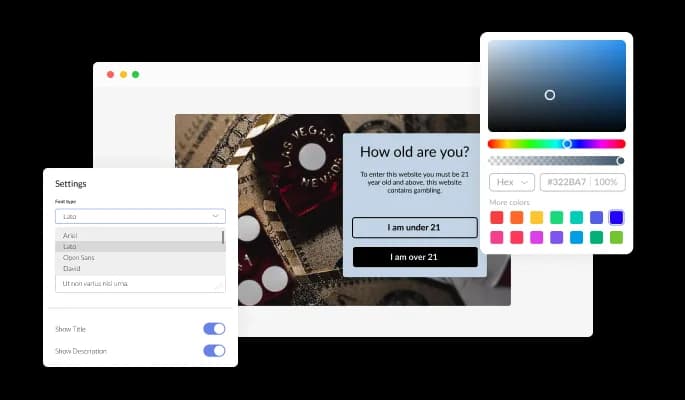
Age Gate gives you full control over colors, fonts, spacing, and layout details. You can fine-tune every visual element to match your brand and website style, all through an intuitive editor without technical effort.

Age Gate adapts automatically to desktop, tablet, and mobile screens, ensuring the verification popup looks and functions properly on any device. This helps you deliver a consistent experience in today’s mobile first browsing environment.

For advanced design needs, Age Gate supports custom CSS. This allows you to fine-tune styles, animations, and layout details for a more tailored integration with your website.

Adding Age Gate to your website is quick and straightforward. Copy a single embed code and paste it into your site, and any updates you make will automatically appear on your live pages.
Age Gate includes a curated set of icons that you can add to the verification popup. These visual elements help reinforce the message, improve clarity, and create a more polished and trustworthy appearance.
With customizable display rules, Age Gate lets you control exactly how the verification popup is triggered. You can choose actions such as page exit, scroll behavior, timed delays, or specific page conditions to align with your user flow.
Age Gate allows you to set a custom redirect URL when a visitor does not meet the required age. Instead of blocking access entirely, you can guide users to another page of your choice, creating a smoother and more considerate browsing experience.
Age Gate is designed for ease of use and does not require coding knowledge. Using a visual editor with drag and drop controls, you can customize the widget quickly and apply changes in just a few clicks.
Common Ninja has amazing no-code widgets that would beautify a website built on any builder. It is very easy to use and customise. It has as many widgets for almost everyone willing to make their website impressive.
Outstanding service. I use their widgets to help me with my web design business and whenever I need help they are very quick to help.
Excellent company with excellent service!!! We used it to build a survey, it was very user friendly. The service was perfect. Amit helped us with every problem and question we had, thank you very much!!!
Common Ninja saved the day when building our website and the customer service Daniel, the co-founder and CEO, provided was amazing.
No. It asks, and it records the answer the visitor gives. Nothing that runs in a browser can confirm a date of birth, and any widget claiming otherwise is overselling. What a gate does is make the question explicit, which is what the practice in these categories is built around.
The lightest one your situation allows. A confirmation button loses the fewest visitors. A birth year asks for slightly more. A full date of birth is the strictest and the most abandoned. Reaching for the hardest option by default costs traffic without changing what the gate can actually prove.
You set a redirect URL and they go there. Leaving them on a blocked screen is the worse option, and picking a sensible destination is a single field in the editor.
Yes, through display rules. Trigger the popup on specific pages, on load, after a delay, on scroll, or on exit intent. Gating a whole site when only the shop needs it costs you every visitor who came for the blog.
Configure the display rules so it fires when a visitor arrives at the restricted area rather than repeatedly. A gate that reappears on every page reads as broken and is the fastest way to lose someone who already answered.
Yes, the popup adapts to desktop, tablet, and mobile. Check it on a real phone, because a date of birth field with three dropdowns is noticeably harder on a small screen and that is where the abandonment shows up.
Yes. Several layouts and ready-made skins, plus control over colours, fonts, spacing, and icons, with custom CSS for anything the built-in settings do not reach.
Pick your platform. Each takes under 4 minutes.

Easily craft engaging, personalized popups to boost conversions.

Display important notifications with a popup
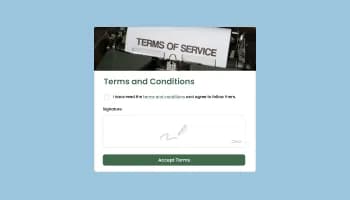
Allow users to sign a consent form, save submissions, enable notifications, and more

Promote coupons and discounts with a popup

Allow users to send messages or inquiries, save submissions, enable notifications, and more

Display important messages and notifications in a designed bar, at the top or bottom of the screen
Age Gate is a website feature that asks visitors to confirm they meet a minimum age before accessing restricted content or products. It helps ensure that only appropriate audiences can continue beyond the entry point.
An Age Gate should be used whenever your website includes content or offerings that are legally limited by age. Common examples include alcohol, vaping, gambling, adult material, and regulated health related products.
When implemented thoughtfully, Age Gate improves clarity and trust. It sets clear expectations upfront, prevents users from encountering unsuitable content, and keeps the rest of the site clean and uninterrupted.
Yes. Age Gate includes multiple layout options so you can choose a structure that fits your website design and content flow.
Yes. Age Gate supports different confirmation methods, such as confirmation buttons, entering a birth year, or providing a full date of birth, allowing you to choose the approach that fits your needs.
Yes. You can customize colors, fonts, spacing, and layout details so the Age Gate popup blends seamlessly with your website’s visual identity.
Yes. Age Gate allows the use of custom CSS for advanced styling and fine grained visual control.
Yes. Age Gate includes flexible display rules that let you choose when the popup is shown, such as on page load, after a delay, on scroll, or when a visitor attempts to exit the page.
You can redirect visitors to another page if they do not meet the age requirement. This allows you to guide users appropriately instead of blocking access completely.
You can create an Age Gate widget from your Common Ninja dashboard, customize it in the editor, and embed it on your website. A free plan is available, with optional upgrades for additional features.
Yes. Age Gate is available on a free plan with usage limits. Paid plans are available for higher traffic volumes and extended functionality.
No. Adding Age Gate only requires copying a single embed code and pasting it into your website. The process is quick and straightforward.
No. All configuration and customization is handled through a visual editor, so no coding knowledge is required.
Yes. Age Gate works with any website builder or platform that supports custom embeds, including WordPress, Wix, Webflow, Shopify, Squarespace, and others.
Yes. Age Gate is designed with privacy in mind and does not collect or store personal data by default, helping you meet data protection requirements.
Ask visitors to confirm their age before they reach restricted content, with a confirmation button, a birth year, or a full date of birth, a redirect for anyone underage, display rules that decide when and where it fires, multiple layouts and skins, icons, and custom CSS. Embed on 200+ platforms including WordPress, Shopify, Wix, Webflow, and Squarespace.
Set up your age gateNo credit card · No coding