Event List for SiteOrigin

Use an event list to highlight upcoming activities, improve visibility, and help visitors discover events that increase attendance and engagement.

Create Event List

loved by 500K+ businesses

SiteOrigin
plugineditoreditor

Why Should You Use the Event List Widget+?

Increase visibility & awareness with SiteOrigin Event list

Your SiteOrigin website for SiteOriginwill show all your events, along with the relative information, such as date, location, time, etc, when you use the Event list widget. It will be easier to spread awareness of these events if your users can easily browse through these events.

Use SiteOrigin Event list to Increase Attendance

By using the Event list widget, your users will be able to click links for the events they are interested in, which will take them to a landing page, payment pages, etc. Due to this, they are more likely to purchase tickets and attend the event.

Creating a better design

Using the fully customizable Event list widget you can enhance your SiteOrigin website with complementary design and colors.

Stunning layouts for SiteOrigin Event list

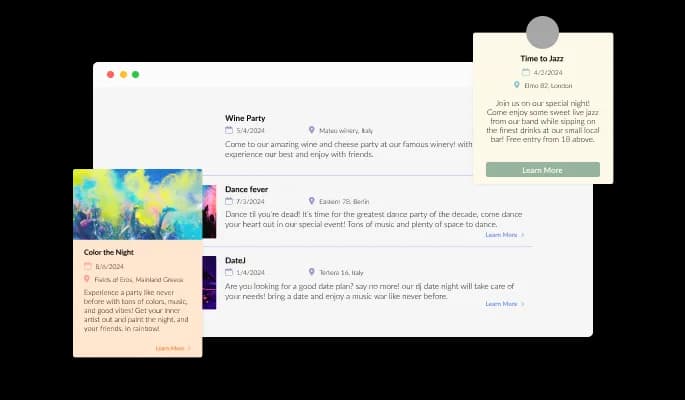
The SiteOrigin Event list widget offers six different layouts that suit every design, from smaller images to larger text, images on the side, and circles and squares. Send the right message and complement your design with the right layout.

Event List - Stunning layouts for SiteOrigin Event list

Stunning skins selection for your SiteOrigin website

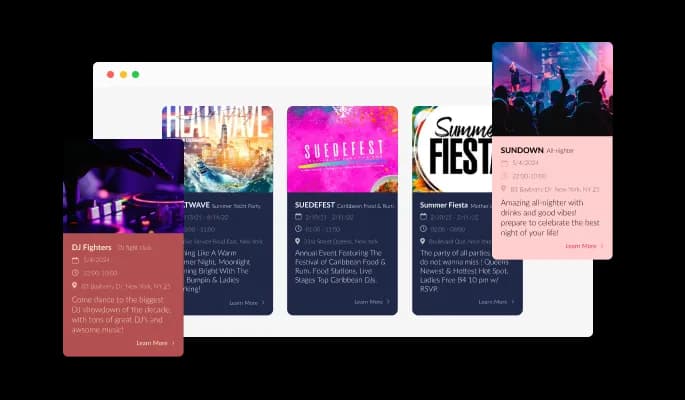
There are a variety of beautiful skins available with the SiteOrigin Event list widget, so you don't have to spend time customizing it for your SiteOrigin website. The skins are designed to complement most design color schemes and can be used to quickly and easily create a Event list widget for your SiteOrigin, website.

Event List - Stunning skins selection for your SiteOrigin website

It is fully customizable widget

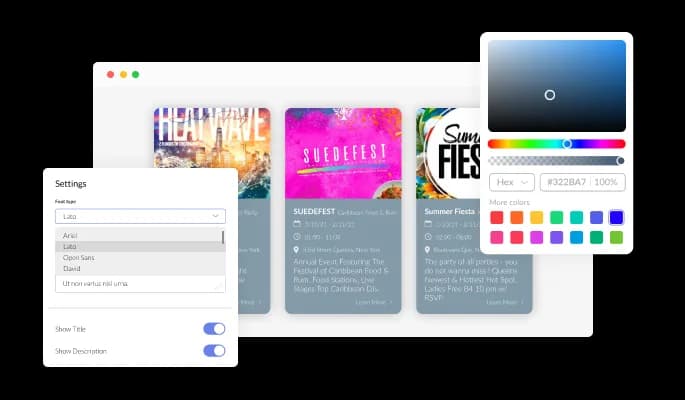
You can customize Event list widget for SiteOrigin to fit the needs of your SiteOrigin website. If you want to change the colors, fonts, spacing, and anything else, feel free to do so!

Event List - It is fully customizable widget
Event List - Images can be used with the SiteOrigin Event list

Images can be used with the SiteOrigin Event list

Events can be enhanced with images, showing locations, halls, musicians, musical instruments, and performers.

Event List - A Simple to use widget

A Simple to use widget

There is no coding required for Event list for SiteOrigin. You can customize widget by dragging-and-dropping on our intuitive dashboard.

Event List - Elegant Animation

Elegant Animation

The SiteOrigin Event list offers the option to enable a gentle animation when a user first accesses the Event list, thereby making the page less static and more appealing.

Event List - Date, time, and location

Date, time, and location

To make information easily visible to your SiteOrigin website users, you can add the location, time, and date of the event using the Event list widget.

It's all about responsive design for your SiteOrigin website

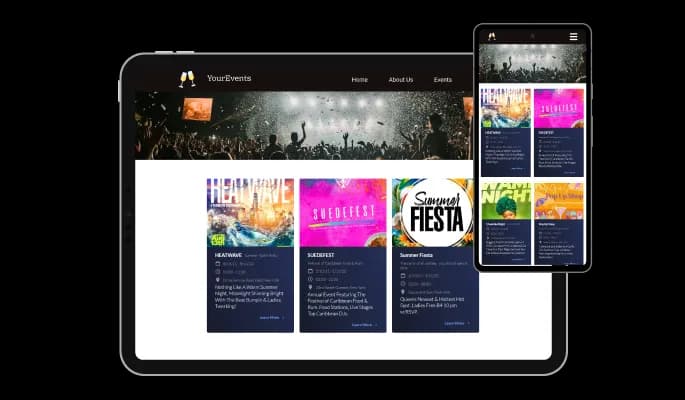
The Event list widget for SiteOrigin is 100% responsive and will look wonderful on any device. Having this feature will ensure that you're ahead of your competitors in a mobile-first world.

Event List - It's all about responsive design for your SiteOrigin website

Custom CSS with Event list for SiteOrigin

Common Ninja's widgets allow you to add custom CSS to make the Event list for SiteOrigin your own.

Event List - Custom CSS with Event list for SiteOrigin

SiteOrigin website Simple embedding

Simply copy and paste a single line of code to embed the Event list widget on your SiteOrigin website. Every time you make a change, the SiteOrigin Event list will be automatically updated on your SiteOrigin website.

Event List - SiteOrigin website Simple embedding

Compatible With All Site Builders, E-Commerce Platforms and Websites

View all supported platforms

FAQ

 Yes, there are six layouts from which you can choose under the Templates tab.

Yes, you can easily choose one of five animation options.

Yes, you can easily do so from the Look & Feel tab.

Yes, you can change its size, color, & border.

Yes, you can toggle any element on or off.

Using the Event List widget is very easy. Simply sign up and start using the free version. There's no need to worry about complicated setup or installation processes, as the Event List widget is designed to be user-friendly and straightforward. Once you've signed up, you'll have access to all of the basic features and functions of the widget, which you can use to enhance your website and improve your online presence. From there, you can choose to upgrade to the paid version if you want to access more advanced features and capabilities. Regardless of which version you choose, you'll find that the widget is a powerful and easy-to-use tool that can help you take your online presence to the next level.

The Common Ninja Event List widget is a free tool reach with features and options. While this widget is free to use, it does have a limit on the number of views it can handle. This means that after a certain number of views, the chat button may no longer be visible or functional on your website. It is important to note that this view limit may vary depending on the plan you are using. Despite this limitation, Common Ninja's Event List is still a valuable tool for businesses looking to increase customer engagement and improve the overall user experience of their website.

The Common Ninja's Event List widget is a versatile tool for any website builder. This means that you can easily add this widget to your website or store no matter what platform you use to build your website. The Event List widget will work seamlessly with your platform whether you are using a popular website builder or something more specialized. This means you can enjoy all the benefits of this powerful tool without having to worry about compatibility issues.

The Event List widget is designed to comply with the General Data Protection Regulation (GDPR), a set of EU regulations protecting personal data and privacy. When using the Event List widget, you can be confident that it will not collect or store personal data that could violate GDPR regulations. This ensures that your business is in compliance with these regulations and can protect your customers' data privacy. Overall, the Event List widget is a secure and reliable tool that can be used to enhance your website without any concerns about GDPR compliance.

No need for coding skills. Our Event List widget is designed to be easy to use, even for those with limited technical experience. The widget features a user-friendly interface that allows you to easily customize the widget without coding knowledge. You can fully customize the Event List to match your branding. When you're done, simply copy the provided code and paste it into your website. It's that simple!

Yes. We are eager to hear your request. Please visit our Feature Request page.

There are several potential benefits to displaying an event list widget on your website. Here are a few examples:

  • It can help to keep visitors engaged by providing them with a regularly updated source of information about upcoming events.
  • It can make it easier for visitors to find and learn about events that are relevant to their interests.
  • It can help to promote your events and attract more attendees.
  • If your website includes a calendar feature, an event list widget can help visitors to easily add events to their personal calendars.
  • It can help improve your website's overall user experience by providing a useful and convenient feature.


An event list widget is a user interface element that displays a list of upcoming events. It is typically found on websites and is often used to promote events and encourage visitors to attend. An event list widget typically includes information such as the event name, date, location, and a brief description. Some event list widgets also allow users to filter or search for events based on specific criteria, such as the type of event or the location. Event list widgets are often used with a calendar feature, allowing users to add events to their calendars easily.