Testimonials Slider for WebStarts

Add a testimonials slider to your site to showcase real customer feedback, build credibility, and increase trust that leads to higher conversions.

Create Testimonials Widget

loved by 500K+ businesses

WebStarts
plugineditor

Why Should You Use the Testimonials Slider Widget+?

Enhance credibility with testimonials for WebStarts

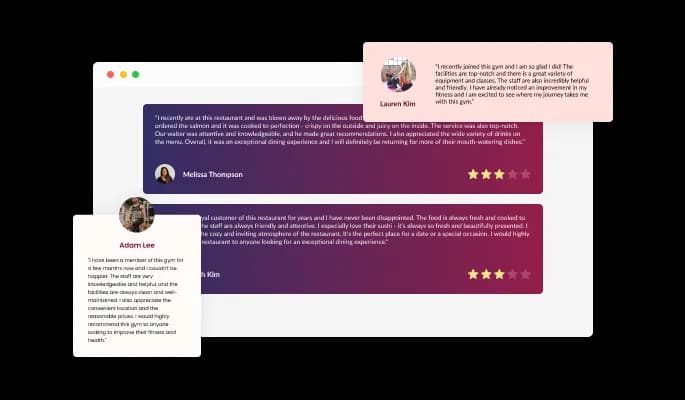
Enhance your credibility by displaying a stellar testimonials slider on your WebStarts website. Create compelling testimonials, add stars and make sure your users are enthralled by what they read!

Enhance the design of your WebStarts website

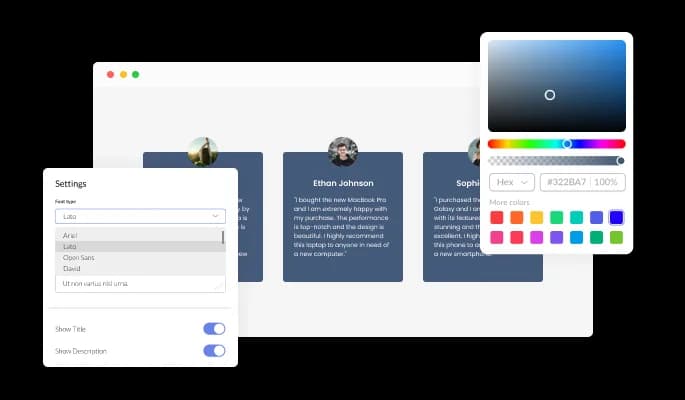
Using full customization options, you can design your testimonials carousel for WebStarts to complement the style of your overall WebStarts website page, or you can make them contrast it. Choose what's right for you!

Add Your Offline Reviews and testimonials for WebStarts

You can submit your offline reviews online! Praise may be sent by email, instant messaging, or other means that cannot easily be shared online. Copy the text to the Testimonials Slider Widget and share the praise you’ve received on your WebStarts website!

Unique Testimonials Layouts

There are three popular layout styles within the Testimonials carousel for WebStarts, each of which rearranges the elements within the testimonials in a way that creates a completely new style that you can use to enhance the appearance of your WebStarts website. You can further customize your layouts by toggling the "Stretch Height" option, which will make all testimonials as tall as the tallest, thus creating a single, unified design.

Testimonials Slider - Unique Testimonials Layouts

Beautiful Skins for your WebStarts website

WebStarts Testimonials app provides a wide range of beautiful skins that can help kickstart your testimonial creation process and avoid spending excessive time on customization. In addition to complementing most design color schemes, these skins will enable you to create a beautiful Testimonials slider quickly and effortlessly for your WebStarts website.

Testimonials Slider - Beautiful Skins for your WebStarts website

The app design is fully customizable

With the Testimonials slider app for WebStarts, you can fully customize the design to meet the needs of your WebStarts website. You can alter the colors, fonts, spacing, and anything else you please!

Testimonials Slider - The app design is fully customizable
Testimonials Slider - A variety of advanced Testimonials slider control options

A variety of advanced Testimonials slider control options

With the Testimonials Slider for WebStarts, you can add control elements like arrows and pagination to improve your WebStarts website's navigation and user experience. The background and arrow containers can also be customized and enhanced by adding a "fade edge" effect.

Testimonials Slider - Different WebStarts [app_nae] Icons

Different WebStarts [app_nae] Icons

The Testimonials app for WebStarts features a lovely set of arrow icons that you can choose from. There are many different types of container types you can use with the Testimonials app to ensure that it fits the design needs of your WebStarts website.

Testimonials Slider - Right to Left Content Support

Right to Left Content Support

Those writing right-to-left can use the Testimonials slider app for WebStarts with RTL support. Get your news out to users from all over the world on your WebStarts website.

Testimonials Slider - A Simple to use Testimonials slider app

A Simple to use Testimonials slider app

There is no need to know any coding to use Testimonials slider [for WebStarts. You can customize app by dragging-and-dropping on our intuitive dashboard.

Fully Responsive for your WebStarts website

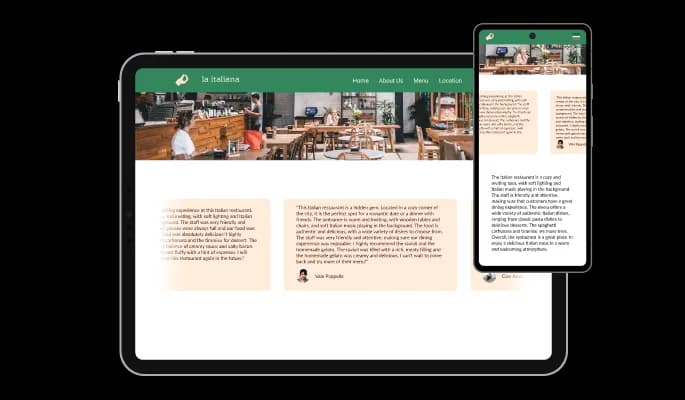
The Testimonials slider app for WebStarts is 100% responsive and will look wonderful on any device. In addition to being totally responsive, or effortlessly adjusting to match the screen size of any device, it also offers a sleek and contemporary style that will improve the overall appearance of your WebStarts website. In a world where more and more people are accessing the internet through their phones and tablets, it is crucial to have a website that is optimized for mobile viewing. To give you an advantage over rivals, the Testimonials slider app will enable you to do that.

Testimonials Slider - Fully Responsive for your WebStarts website

Creating custom CSS for Testimonials slider for WebStarts

As with the rest of Common Ninja's apps, Testimonials slider for WebStarts can be further customized using custom CSS. With this feature, you can easily customize every aspect of the app's look and feel, from the colors and fonts to the layout and positioning. But if you're feeling particularly creative, you can take your customization to the next level by editing the CSS directly. This enables you to customize the Testimonials slider app by making even more sophisticated adjustments. Our advanced editor includes everything you need, whether you want to make a few straightforward adjustments or go all out with sophisticated changes.

Testimonials Slider - Creating custom CSS for Testimonials slider for WebStarts

An Easy Way To Embed On Your WebStarts website

Copy a line of code, and you will be able to embed the Testimonials slider app on your WebStarts website. Every time you make a change, the WebStarts Testimonials slider will be automatically updated on your WebStarts website.

Testimonials Slider - An Easy Way To Embed On Your WebStarts website

Compatible With All Site Builders, E-Commerce Platforms and Websites

View all supported platforms

FAQ

Yes, you can do so by using selecting the review you’d like to change the rating in, and moving the rating slider to the desired result. 

Yes, you can do so from within the “Look & Feel” tab.

Yes, you can do so from within the “Look & Feel” tab.

Yes, you can do so from within the “Look & Feel” tab.

Yes, you can do so from within the “Look & Feel” tab.

Yes, you can do so from within the “Look & Feel” tab.

Yes, you can do so from within the “Look & Feel” tab.

Yes, you can do so from within the “Look & Feel” tab.

Yes, you can do so from within the “Look & Feel” tab.

Yes, you can do so from within the “Look & Feel” tab.

Yes, you can do so from within the “Settings” tab.

Yes, you can do so from within the “Settings” tab.

Yes, you can do so from within the “Settings” tab.

Can I change the Testimonial’s carousel speed?

Using the Testimonials Slider widget is very easy. Simply sign up and start using the free version. There's no need to worry about complicated setup or installation processes, as the Testimonials Slider widget is designed to be user-friendly and straightforward. Once you've signed up, you'll have access to all of the basic features and functions of the widget, which you can use to enhance your website and improve your online presence. From there, you can choose to upgrade to the paid version if you want to access more advanced features and capabilities. Regardless of which version you choose, you'll find that the widget is a powerful and easy-to-use tool that can help you take your online presence to the next level.

The Common Ninja Testimonials Slider widget is a free tool reach with features and options. While this widget is free to use, it does have a limit on the number of views it can handle. This means that after a certain number of views, the chat button may no longer be visible or functional on your website. It is important to note that this view limit may vary depending on your plan. Despite this limitation, Common Ninja's Testimonials Slider is still a valuable tool for businesses looking to increase customer engagement and improve the overall user experience of their website.

The Common Ninja's Testimonials Slider widget is a versatile tool for any website builder. This means that you can easily add this widget to your website or store no matter what platform you use to build your website. Whether you are using a popular website builder or something more specialized, the Testimonials Slider widget will work seamlessly with your platform. This means you can enjoy all the benefits of this powerful tool without having to worry about compatibility issues.

It’s very easy to embed Common Ninja’s Testimonials widget on your website and the process consists of two steps:


  1. Once you’ve finished working with the Testimonials widget, copy the HTML text that can be found under the 'Add to Website' tab on the app’s dashboard.
  2. On your website builder, find the 'embed' widget option, place it where you want the Testimonials widget to appear, and then paste the HTML code you’ve copied before into the widget.

The Testimonials Slider widget is designed to comply with the General Data Protection Regulation (GDPR), a set of EU regulations protecting personal data and privacy. When using the Testimonials Slider widget, you can be confident that it will not collect or store personal data that could violate GDPR regulations. This ensures that your business is in compliance with these regulations and can protect your customers' data privacy. Overall, the Testimonials Slider widget is a secure and reliable tool that can be used to enhance your website without any concerns about GDPR compliance.

No need for coding skills. Our Testimonials Slider widget is designed to be easy to use, even for those with limited technical experience. The widget features a user-friendly interface that allows you to easily customize the widget without coding knowledge. You can fully customize the Testimonials Slider to match your branding. When you're done, simply copy the provided code and paste it into your website. It's that simple!

Embedding the Testimonials Slider widget on your website is a straightforward process. Simply copy the provided code and paste it into the desired location on your website. The widget will seamlessly integrate into your site, allowing you to take advantage of its features and functions. No technical expertise or programming knowledge is required - just copy and paste the code to get started. This simple process allows you to easily add the widget to your website and enhance its functionality without any hassle.

Yes. We are eager to hear your request. Please refer to this page.

Displaying testimonials on your website can have several benefits, including:

  1. Increased credibility: Testimonials from satisfied customers can help increase the credibility of your business and the products or services you offer. Seeing positive reviews from real people can help potential customers feel more confident in their decision to do business with you.
  2. Improved trust: Testimonials can help establish trust with potential customers by providing evidence that your business is reliable and provides a good customer experience.
  3. Enhanced social proof: Testimonials can show potential customers that other people have had positive experiences with your business. This can help increase the perceived value of your products or services and encourage more people to buy.
  4. Increased conversions: By providing positive reviews and testimonials, you can increase the likelihood that potential customers will convert into paying customers.
  5. Greater customer satisfaction: Testimonials can also help improve the overall satisfaction of your customers by providing them with a platform to share their positive experiences with others. This can help create a sense of community and encourage customers to continue doing business with you.


Displaying testimonials on your website can help increase your business's credibility, trust, and perceived value, which can lead to increased conversions and customer satisfaction.

Social proof, also known as informational social influence, is a psychological phenomenon in which people look to the actions and behaviors of others to guide their own decisions and behaviors. It is based on the idea that people are more likely to trust and follow the actions of others, especially when they perceive those others to be similar to themselves or to be experts in a particular field.


In the context of marketing and branding, social proof can influence potential customers' decisions by showing them that other people have had positive experiences with a product or service. This can be achieved through various means, such as displaying customer reviews, testimonials, social media followers, or other metrics that demonstrate the popularity or success of a product or service.


Using social proof can be an effective way to increase the perceived value of a product or service and to encourage more people to purchase or use it. It can also help build trust and credibility with potential customers, as they are more likely to trust the opinions of others than they are to trust a business's claims.

A testimonial widget is a pre-designed, interactive element that can be added to a website or application to display customer testimonials or reviews. Testimonial widgets are often created using JavaScript libraries or other web development tools and can be easily customized to display different types of testimonials or to meet specific design requirements.


Testimonial widgets can be used to display customer feedback clearly and concisely, making it easier for visitors to the website or users of the application to understand the experiences of others with the business or product. They can also be interactive, allowing users to browse multiple testimonials or filter them by specific criteria, such as product or service.


Using testimonial widgets can help improve the user experience on a website or application by providing valuable information about the business or product and by making it more engaging for users to browse through the testimonials. They can also be a valuable tool for presenting customer feedback in a professional and visually appealing way, which can increase the credibility of the information being presented.