


Verified review
Common Ninja has amazing no-code widgets that would beautify a website built on any builder. It is very easy to use and customise. It has as many widgets for almost everyone willing to make their website impressive.
Try the editor, no signup
Pick a template, customize it, and watch it update live, no signup.
No credit card · Free forever plan
No credit card · Free forever plan
The Common Ninja TikTok Carousel is a free, no-code widget that shows TikTok videos rotating in one band of your website. Connect the account, set the timing, and paste one line of embed code.
Several videos stay in view at once, so the section reads as an active account rather than a single clip somebody chose to feature.
The content refreshes itself, slides are clickable, speed and time per slide are adjustable, and custom CSS is available. Works on 200+ platforms including WordPress, Wix, Shopify, Squarespace, and Webflow.
Stacked video embeds eat a page and nobody reaches the third one. A carousel holds a handful in a single horizontal strip, so a visitor browses across rather than scrolling past.
One featured clip could be from any time. Several rotating, refreshing themselves, is the signal that there is someone actually posting, which is most of what social proof does on a page.
Short video answers the questions a photo cannot. A rotating set next to a product covers several of them without you deciding in advance which one the shopper needed.
Clickable videos turn the strip into a follower path. Visitors who arrived from search can see what the account is like and act on it in one click.
Point the widget at the TikTok account you want on the page. Videos arrive with their thumbnails and new posts pull in on their own.
Choose how many videos are visible at once and set the slider speed and time per slide. TikTok video is portrait, so two or three across is usually the most you can show before each one gets too narrow to read.
Copy the snippet from the Add to Website tab and paste it where the carousel belongs. Posting on TikTok updates the section with no second step.
Set how fast the carousel moves and how long each video holds. Video needs longer than an image, because a thumbnail has to register before it rotates away.
New posts pull in without you editing the page or re-pasting the embed code, which is the whole difference between a widget and a screenshot.
Each slide is interactive, so visitors play what interests them instead of being shown one clip and left with it. Browsing is the point of a carousel.
The visible slide count drops on narrow screens so portrait video stays watchable, and a custom CSS field handles exact design matching. One embed snippet, 200+ platforms.

Navigate through your TikTok content with ease using intuitive arrows and pagination. These navigation tools make it simple for visitors to explore your TikTok videos, enhancing the interactivity and accessibility of your website’s content.

Tailor the TikTok Carousel to fit your brand with extensive customization options. Adjust everything from colors and fonts to the carousel’s overall size, ensuring your TikTok content aligns perfectly with your website's look and feel. This high degree of customization supports brand consistency and user engagement.

Designed to look great on any device, the TikTok Carousel Widget ensures your TikTok content is accessible and engaging, whether viewed on a desktop, tablet, or smartphone. This responsiveness is crucial for maintaining a quality user experience in today’s mobile-first world.

Dive deeper into customization with the option to add custom CSS to your TikTok Carousel Widget. This feature is ideal for those who want to push the boundaries of design and functionality, providing the flexibility to create a truly unique experience for your website visitors.

Embedding the TikTok Carousel Widget on your website is straightforward, requiring just a single line of code. This ease of integration makes it simple to keep your site updated with the latest TikTok content, ensuring your audience always has something new and exciting to discover.
Control how your audience interacts with your TikTok Carousel by adjusting the slider speed and the duration each TikTok video is displayed. This customization ensures viewers have ample time to engage with your content, tailored to the pacing that suits your website’s rhythm.
The TikTok Carousel Widget is designed to keep your website vibrant and engaging by automatically updating with the latest content from your TikTok feed. This feature ensures that your site remains fresh, dynamic, and aligned with current trends, encouraging visitors to return regularly for new and exciting content.
Enhance user interaction on your website with clickable content within the TikTok Carousel Widget. This feature allows visitors to engage directly with your TikTok videos, fostering a deeper connection with your content. By enabling viewers to click through to TikTok or interact with the videos right on your site, you create a more immersive and interactive experience, boosting engagement and time spent on your site.
The TikTok Carousel Widget is designed for simplicity, making it easy for anyone to add and customize on their website without needing any coding skills. An intuitive interface ensures you can effortlessly integrate and manage your TikTok content, enhancing your site’s functionality with ease.
Build your TikTok carousel in the editor
Open the editorFree to use · No credit card · No signup to try it
Common Ninja has amazing no-code widgets that would beautify a website built on any builder. It is very easy to use and customise. It has as many widgets for almost everyone willing to make their website impressive.
Outstanding service. I use their widgets to help me with my web design business and whenever I need help they are very quick to help.
Excellent company with excellent service!!! We used it to build a survey, it was very user friendly. The service was perfect. Amit helped us with every problem and question we had, thank you very much!!!
Common Ninja saved the day when building our website and the customer service Daniel, the co-founder and CEO, provided was amazing.
No. On TikTok a carousel usually means a photo post you swipe through, and that is made in the TikTok app when you create the post. This widget works the other way round: it takes content that already exists on TikTok and displays it as a rotating carousel on your own website.
Use the carousel for several videos rotating in one band, when the point is showing an active account. Use the slider for one video at a time at full width, which suits vertical video better if you want it actually watched. Use the TikTok Feed for a grid, list, or scrolling ticker. All three are free.
No. You paste the account into the editor and Common Ninja handles fetching the posts. There is no developer application to file, no API key, and no quota to monitor.
Two or three on a desktop width. TikTok video is portrait, so each extra column makes every video narrower, and four across usually leaves thumbnails too small to tell apart. The count drops automatically on narrow screens.
Yes, for public accounts, which covers featuring a brand ambassador, a partner, or creators posting about your product. Private accounts and removed posts will not appear.
The carousel shows thumbnails and only loads a player when a visitor plays something, so the page does not arrive carrying several video players. That is why a carousel is lighter than stacking native embeds.
The carousel keeps showing the most recent posts it found, so it will not empty out, but it will age visibly. If posting has stopped, point the widget at an active account or take the section down.
Yes, and the visible slide count drops so videos stay watchable. Portrait video suits a phone naturally; it is the desktop width where you should check that three across has not made everything too narrow.
Pick your platform. Each takes under 4 minutes.

Display the latest posts from your Instagram page

Display a feed of the latest posts from a Facebook user or page

Display the latest tweets from your X
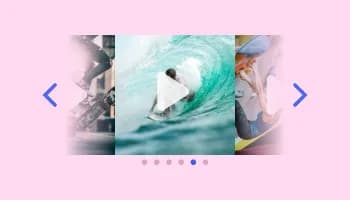
Showcases videos in a rotating or sliding manner

Showcases videos from various sources in a variety of visually appealing layouts and grids

Showcases images in a rotating or sliding manner
The TikTok Carousel Widget allows you to display your TikTok content in a dynamic, engaging carousel format directly on your website. It's a tool designed to enhance site engagement by showcasing TikTok videos in an interactive and visually appealing manner.
The widget automatically syncs with your TikTok account, ensuring that the latest videos are displayed on your website without any manual updates needed from your side.
Yes, the TikTok Carousel Widget is fully customizable, allowing you to adjust colors, fonts, layouts, and more to seamlessly integrate with your website's aesthetic.
Absolutely. The widget is designed to be fully responsive, ensuring a smooth and engaging experience across all devices, including desktops, tablets, and smartphones.
Yes, the content within the TikTok Carousel Widget is clickable, enabling users to interact with your TikTok videos directly from your website.
No coding skills are required. The widget can be easily embedded in your site with a simple line of code, and its intuitive dashboard allows for effortless customization
The widget offers settings to adjust the slider speed and the time each video is displayed, giving you complete control over how your content is presented.
Yes, the option to add custom CSS is available for further customization, providing the flexibility to fine-tune the appearance and functionality of your carousel.
The number of videos you can display is customizable, allowing you to choose how many TikTok videos are shown in your carousel to best fit your website's design and user experience.
Yes, the TikTok Carousel Widget includes navigation controls such as arrows and pagination for easy browsing of your TikTok content.
The widget typically auto-updates with your latest content, but settings allow you to curate which TikTok videos appear, offering you control over the displayed content.
The widget is optimized for performance, ensuring minimal impact on your site's loading times while providing a dynamic content experience.
Yes, it's designed to be compatible with virtually any website platform, making it versatile for different users and needs.
Support is available through the widget's dashboard, where you can access FAQs, submit support tickets, or find contact information for direct assistance.
Several TikTok videos rotating in one band of your website, refreshing themselves, with adjustable speed and timing, clickable slides, thumbnail-first loading, full responsiveness, and custom CSS. Embed on 200+ platforms including WordPress, Wix, Shopify, Squarespace, and Webflow.
Create your TikTok carouselFree to use · No credit card · No coding