


Verified review
Common Ninja has amazing no-code widgets that would beautify a website built on any builder. It is very easy to use and customise. It has as many widgets for almost everyone willing to make their website impressive.
The Common Ninja WhatsApp Button widget is a free, no-code chat button that opens a WhatsApp conversation with your business the moment a visitor taps it.
Enter your number, pick an icon and floating position, optionally pre-fill the first message, set business-hour visibility, then paste one line of embed code on 200+ platforms including Canva, Webflow, Bolt, Lovable, and Google Sites.
Setup runs under 3 minutes.
A floating WhatsApp button gives someone with a quick question a frictionless way to ask, instead of leaving to compare on Google. For service businesses, real-estate listings, online stores, and consultants, the live chat option is often the difference between a lead and a lost session.
WhatsApp has 2B+ users and is the default messaging app in most of the world. Meeting customers there beats funneling them into a custom chat widget they will not remember to check tomorrow. Notifications land on their phone, conversations persist, history is searchable.
A web form goes to an inbox you check tomorrow morning. A WhatsApp ping shows up on the phone in your pocket. Toggle the button off after hours, or leave it on and answer when you can. Either way you do not lose the lead to a competitor whose form was less convenient.
Most pre-sale questions are simple: price, availability, shipping, location. Answering them in a 30-second WhatsApp message clears the question faster than typing an email, and the visitor stays warm on the page instead of context-switching to their inbox.
Type the WhatsApp Business or personal number you want messages routed to, in international format. The widget builds the wa.me deep link automatically, so taps from desktop open WhatsApp Web and taps from mobile open the WhatsApp app on the visitor's device.
Pick an icon from the library, set colors and size, choose where the floating button sits (bottom-right is standard, configurable). Optionally pre-fill the first message visitors send ("Hi, I have a question about X") so the conversation starts with context instead of a blank chat.
Copy the embed snippet and drop it into your site. Future edits to the number, message, icon, or business-hour rules push live automatically, so changing the routing destination is a single change in the dashboard, not a code commit.
Set the message visitors send when they tap the button, such as "Hi, I have a question about your pricing" or "Hi, I saw your listing for [property]." Conversations start with context, so your team replies faster and visitors do not freeze at a blank chat.
Show the button during business hours and hide it overnight, or keep it on 24/7 with an auto-reply message. Set per-day windows so weekend hours can differ from weekday hours, and the right region's time zone drives the schedule.
Pick the icon from the library (chat bubble, headset, phone, custom upload), set the button color to match your brand, choose left or right floating position, and decide whether it follows scroll or stays fixed in the corner.
On phones the button sits comfortably above the navigation bar so it does not cover the page content. A single tap opens the WhatsApp app directly, with no QR-scanning step, no copy-pasting numbers, and no lost taps to a download prompt.
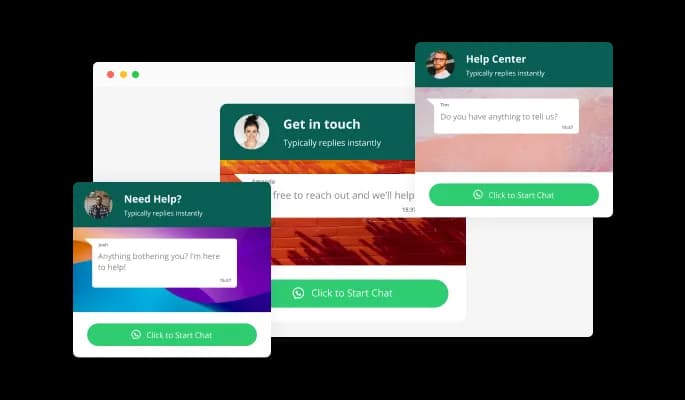
The WhatsApp Chat widget allows you to change the chat’s background to make it fit your website’s design, make your chat stand out, or reinforce brand awareness via well-crafted company backgrounds.
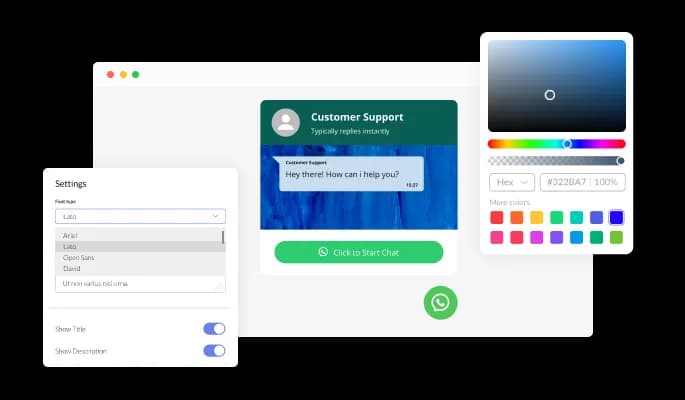
The WhatsApp Chat widget features full customization options so you can edit the design to fit your needs — change the colors, fonts, spacings and anything else!
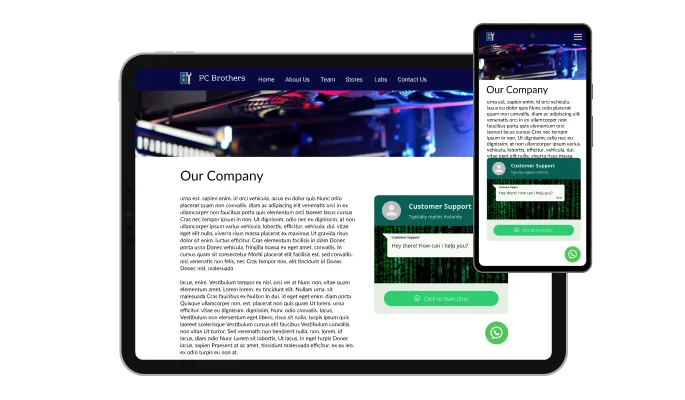
The WhatsApp Chat widget is perfectly responsive and will look great on any device. In a mobile-first world, this feature will put you ahead of your competitors.

As with all of Common Ninja’s apps, you can add custom CSS to customize the WhatsApp Chat widget and be even more creative.

You can embed the WhatsApp Chat widget on your website easily by copying a single line of code. The app will also be updated automatically with every change you make.
The WhatsApp Chat Button widget features multiple button icons for you to choose from that can complement your design and deliver the message you want to deliver.
The WhatsApp Chat widget features the ability to toggle the messages’ time on or off. Keep it on to show users just how fast your replies are, or remove it entirely for a more minimal, visually pleasant chat design.
The WhatsApp Chat widget is easy to use and requires no coding knowledge. Our intuitive dashboard with the drag-and-drop feature will enable you to customize the app any way you want it with just a few simple clicks.
Common Ninja has amazing no-code widgets that would beautify a website built on any builder. It is very easy to use and customise. It has as many widgets for almost everyone willing to make their website impressive.
Outstanding service. I use their widgets to help me with my web design business and whenever I need help they are very quick to help.
Excellent company with excellent service!!! We used it to build a survey, it was very user friendly. The service was perfect. Amit helped us with every problem and question we had, thank you very much!!!
Common Ninja saved the day when building our website and the customer service Daniel, the co-founder and CEO, provided was amazing.
Yes. The free plan covers one WhatsApp Button widget with no time limit, no credit card, and no trial countdown. Upgrade only when you need additional widgets, premium skins, or higher monthly view limits.
No. Build and customize the entire button in a drag-and-drop editor, then paste one line of embed code into your site. Most users finish setup in under 3 minutes.
The widget uses the official wa.me deep-link scheme, so a tap on a phone opens the WhatsApp app directly to a chat with your number. A click on desktop opens WhatsApp Web. Visitors do not need to scan a QR code, copy a number, or download anything. The conversation starts with one tap.
Yes. Set the pre-filled message in the editor, something like "Hi, I have a question about your pricing" or "Hi, I saw your listing for [address]." The visitor sees the message in their chat ready to send, so the conversation starts with context instead of a blank screen.
Yes. Toggle business-hour visibility in the editor and set per-day windows. The button shows during your configured hours and hides overnight or on weekends. Alternatively, keep it on 24/7 with an auto-reply that tells visitors when to expect a response.
Yes. Both Bolt (bolt.new) and Lovable accept embed snippets. In Bolt you can paste the Common Ninja embed directly into your generated HTML, and in Lovable you can add a Custom HTML block that holds the snippet. The button renders as soon as you deploy the preview, and the AI builder will not strip the embed when it regenerates code.
Yes. Open your Canva design, click Apps in the left sidebar, search for Embed, and paste the Common Ninja embed link. The WhatsApp button runs live inside Canva websites, shareable presentations, and social-media link-in-bio templates.
200+ platforms including Canva, Webflow, Bolt, Lovable, Google Sites, Framer, Squarespace, WordPress, Shopify, Wix, Joomla, Carrd, and any custom HTML page that accepts an embed snippet.
Pick your platform. Each takes under 4 minutes.

Allow users to send messages or inquiries, save submissions, enable notifications, and more

Easily craft engaging, personalized popups to boost conversions.
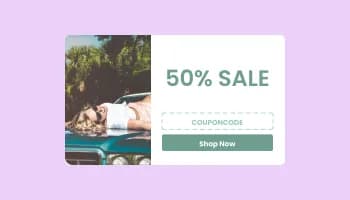
Promot coupon and discount with a popup

Display important messages and notifications in a designed bar, at the top or bottom of the screen
Displays common questions and answers for quick reference

Display the latest posts from your Instagram page
Yes, you can change the contact name.
Yes, you can easily do so in the WhatsApp Chat settings.
Yes, you can upload your own image that will show on the WhatsApp chat.
Yes, you can do so from the dashboard.
Yes, you can.
Yes, you can easily do so from the dashboard.
Yes, you can. Enter the Editor to change the text of the WhatsApp Chat button.
Yes, you can easily do so.
Yes, you can easily do so from the “Look & Feel” tab.
Yes, you can.
Using the WhatsApp Chat widget is very easy. Simply sign up and start using the free version. There's no need to worry about complicated setup or installation processes, as the WhatsApp Chat widget is designed to be user-friendly and straightforward. Once you've signed up, you'll have access to all of the basic features and functions of the widget, which you can use to enhance your website and improve your online presence. From there, you can choose to upgrade to the paid version if you want to access more advanced features and capabilities. Regardless of which version you choose, you'll find that the widget is a powerful and easy-to-use tool that can help you take your online presence to the next level.
The Common Ninja WhatsApp Chat widget is a free tool reach with features and options. While this widget is free to use, it does have a limit on the number of views it can handle. This means that after a certain number of views, the chat button may no longer be visible or functional on your website. It is important to note that this view limit may vary depending on the plan of the widget you are using. Despite this limitation, the Common Ninja Hotspot is still a valuable tool for businesses looking to increase customer engagement and improve the overall user experience of their website.
The Common Ninja's WhatsApp Chat widget is a versatile tool for any website builder. This means that you can easily add this widget to your website or store no matter what platform you use to build your website. Whether you are using a popular website builder or something more specialized, the WhatsApp Chat widget will work seamlessly with your platform. This means you can enjoy all the benefits of this powerful tool without having to worry about compatibility issues.
It’s very easy to embed Common Ninja’s WhatsApp Chat Button app on your website and the process consists of two steps:
The WhatsApp Chat widget is designed to comply with the General Data Protection Regulation (GDPR), a set of EU regulations protecting personal data and privacy. When using the WhatsApp Chat widget, you can be confident that it will not collect or store personal data that could violate GDPR regulations. This ensures that your business is in compliance with these regulations and can protect your customers' data privacy. Overall, the WhatsApp Chat widget is a secure and reliable tool that can be used to enhance your website without any concerns about GDPR compliance.
No need for coding skills. Our Messenger Chat widget is designed to be easy to use, even for those with limited technical experience. The widget features a user-friendly interface that allows you to easily customize the widget without coding knowledge. You can fully customize the Messenger Chat to match your branding. When you're done, simply copy the provided code and paste it into your website. It's that simple!
Embedding the WhatsApp Chat widget on your website is a straightforward process. Simply copy the provided code and paste it into the desired location on your website. The widget will seamlessly integrate into your site, allowing you to take advantage of its features and functions. No technical expertise or programming knowledge is required - just copy and paste the code to get started. This simple process allows you to easily add the widget to your website and enhance its functionality without any hassle.
Yes. We are eager to hear your request. Please refer to this page.
A WhatsApp chat button widget is a component that you can add to your website that allows visitors to initiate a chat with your business through the WhatsApp messaging app. The widget typically appears as a button or icon on your website. When clicked, it opens a chat window within the WhatsApp app, allowing visitors to send messages to your business.
There are several benefits to adding a WhatsApp chat button on your website:
Works on 200+ platforms including Canva, Webflow, Bolt, Lovable, and Google Sites.
Create your WhatsApp buttonNo credit card · Setup in under 3 minutes