


Verified review
Common Ninja has amazing no-code widgets that would beautify a website built on any builder. It is very easy to use and customise. It has as many widgets for almost everyone willing to make their website impressive.
The Common Ninja Social Media & RSS Feeds widget is a free, no-code embed that combines multiple social and content feeds into one unified panel on your website.
Mix Instagram, Facebook, LinkedIn, X (Twitter), YouTube, Tumblr, and RSS sources in a single widget. Pick layouts (cards, list, grid, ticker), tune auto-refresh, customize the design with skins or Custom CSS, configure character-length and date display per source, and paste a one-line embed snippet on WordPress, Squarespace, Webflow, Shopify, Notion, and 200+ other platforms.
Use it to surface activity from every channel where your audience already lives, build a living social-proof wall, and turn fragmented social presence into a single content stream on your own site.
Most brands publish to Instagram, LinkedIn, X, YouTube, a blog, and maybe TikTok or Tumblr, each on its own platform with its own URL. A single multi-source widget brings them all to your own site, so visitors see the full picture of your activity without bouncing through five different embed iframes.
A multi-source feed turns scattered channels into a single editorial surface on your homepage, footer, or About page. Visitors who'd otherwise miss your YouTube channel (because they came in from search) see your latest video alongside your latest LinkedIn post, a richer signal of brand activity than any single embed.
When you point sources at RSS feeds or URL-based content, the widget polls on a schedule and updates the displayed items when new content publishes. Your social wall stays current without manual maintenance. Publish on LinkedIn, the post appears on your site within the next refresh window.
Common Ninja also ships dedicated Instagram Feed, Facebook Feed, LinkedIn Feed, Twitter/X Feed, and RSS Feed widgets, each tuned for the native visual style of its source platform. Use this multi-source Feeds widget when you want a single panel that combines several platforms; use the dedicated platform widgets when one platform should get a native-styled prominent slot of its own.
Add content from multiple sources in one widget. Paste an RSS URL, add posts manually to mimic Instagram or Facebook content, point at a YouTube channel or Tumblr feed, configure a multi-account aggregation. The widget merges items from all sources into one unified stream sorted by date.
Choose a layout: cards (multi-platform feed grid), list (vertical reading column with source labels), grid (multi-column tile grid), or ticker (horizontal-scrolling marquee). Configure auto-refresh frequency, character-length cutoff for long posts, date display format, and per-source styling. Pick a skin from the design library or layer Custom CSS.
Copy the one-line embed snippet and paste it into your site on WordPress, Squarespace, Webflow, Shopify, Notion, or any of the 200+ supported platforms. Edits in the Common Ninja editor push to every embed. Add a new source, swap layouts, change the refresh interval, and the live page updates without re-paste.
Combine sources of different types: RSS, manually-entered Instagram-style posts, manually-entered Facebook-style posts, YouTube channel pulls, Tumblr feeds, X (Twitter) content. Each source can carry its own styling label so visitors see where each post originated.
Point sources at RSS or URL-based feeds and the widget polls for updates on a schedule. Refresh interval depends on the plan. Free plans poll less frequently than paid plans. New posts appear in your embed automatically as the source publishes.
Layouts include cards, list, grid, and ticker. Each reflows responsively across breakpoints. Skins cover common visual conventions (minimal, magazine, dark-mode, social-true) so the combined feed matches the surrounding page design.
Layer Custom CSS over any skin to control avatar sizing, post-card spacing, source-label typography, timestamp styling, and hover-state finesse. The widget integrates with your site's design system without rebuilding from scratch.
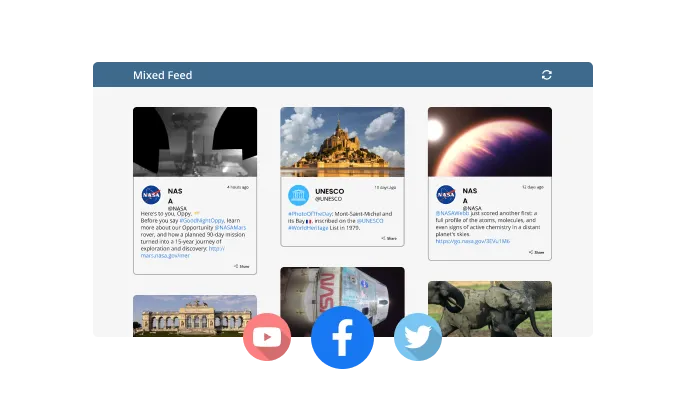
The Social Media & RSS Feeds widget features 3 feed modes — Mixed, Tabs, and News Ticker. These will allow you to customize the widget to show the feeds precisely how you want. One single feed? Separate feeds? The choice is yours!

The Social Media & RSS Feeds feature is designed to help you keep your website's feed content up-to-date and relevant for your audience. With the auto-refresh feature, you don't have to worry about manually updating your feed or losing out on essential updates from your social media accounts or other sources. The widget will automatically check for new content on a regular basis and refresh your feed accordingly, ensuring that your website's visitors always have access to the latest and most relevant information. Whether you want to showcase your latest blog posts, Twitter updates, or news articles, the Social Media & RSS Feeds feature makes it easy to keep your website's feed content fresh and engaging.
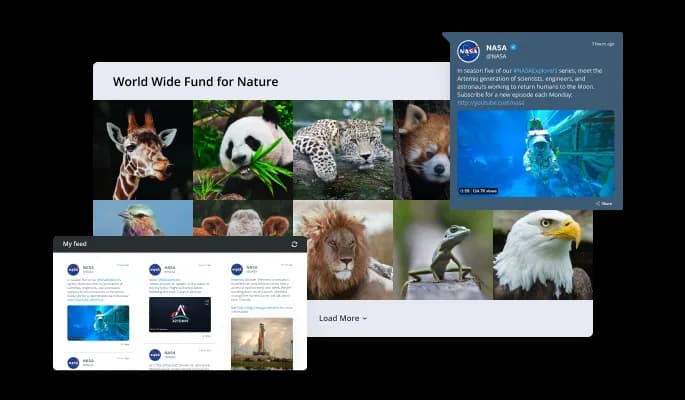
With the Social Media & RSS Feeds widget, you have access to multiple skins and layouts that allow you to customize your feed in any way you want. You can choose from a variety of styles and colors to match your brand, or select a layout that best fits the design of your website. The widget also includes features such as responsive design, infinite scrolling, and lazy loading, which improve the user experience by allowing your visitors to easily access and browse your content without having to refresh the page.
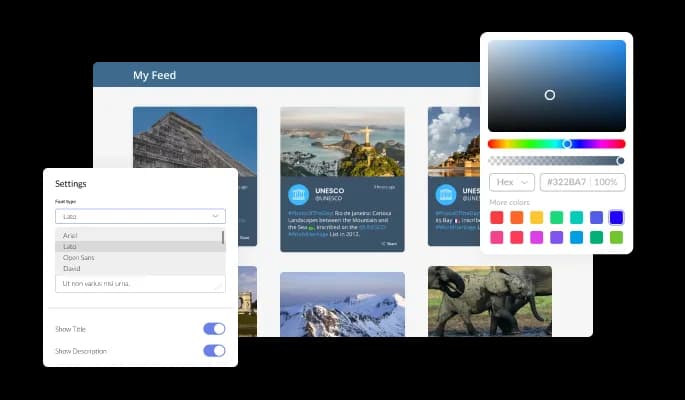
The Social Media & RSS Feeds widget comes with full customization options, giving you the ability to easily edit the design to match the aesthetic of your website. You can change the colors of the slider, buttons, and labels to match your branding. You can also choose from different font options and adjust the font size, style, and color to create a cohesive and professional look. In addition to these design options, you can customize the widget's spacing to ensure it fits seamlessly into your website layout.
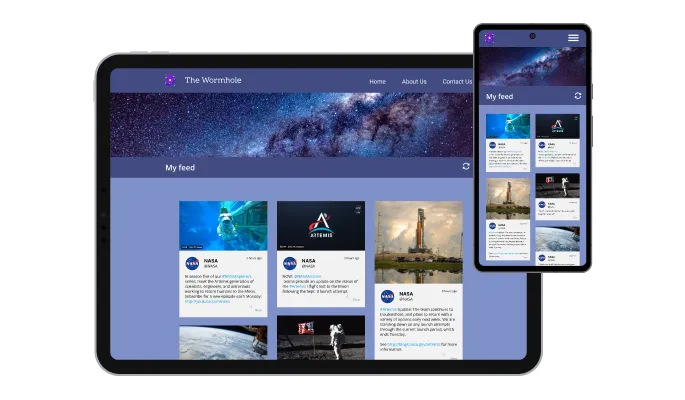
The Social Media & RSS Feeds widget is a valuable tool for any website. Not only is it fully responsive, meaning it will adjust seamlessly to fit the screen size of any device, but it also has a sleek and modern design that will enhance the overall look of your site. In a world where more and more people are accessing the internet through their phones and tablets, it is crucial to have a website that is optimized for mobile viewing. The Social Media & RSS Feeds widget will allow you to do just that, giving you an edge over competitors.

Our advanced editor is a powerful tool that gives you complete control over the appearance of the Social Media & RSS Feeds widget. With this feature, you can easily customize every aspect of the widget's look and feel, from the colors and fonts to the layout and positioning. But if you're feeling particularly creative, you can take your customization to the next level by editing the CSS directly. This gives you the ability to make even more advanced changes to the widget, allowing you to make it your own. Whether you want to make a few simple tweaks or go all out with advanced customizations, our advanced editor has you covered.

To embed the Social Media & RSS Feeds widget on your website, simply copy and paste the provided code snippet into the HTML of your webpage. Additionally, the widget is designed to be self-updating, meaning that any changes you make to the Social Media & RSS Feeds Editor will be reflected automatically on your website without the need for any additional manual updates.
Get full control over the content you want to display in your stream. Filter unwanted posts and edit the post titles to fit your needs.
The Social Media & RSS Feeds widget is easy to use and requires no coding knowledge. Our intuitive dashboard with the drag-and-drop feature will enable you to customize the widget any way you’d like to with just a few simple clicks.
Bring all your channels into one feed on your site
Open the editorNo credit card · Setup in under 5 minutes
Common Ninja has amazing no-code widgets that would beautify a website built on any builder. It is very easy to use and customise. It has as many widgets for almost everyone willing to make their website impressive.
Outstanding service. I use their widgets to help me with my web design business and whenever I need help they are very quick to help.
Excellent company with excellent service!!! We used it to build a survey, it was very user friendly. The service was perfect. Amit helped us with every problem and question we had, thank you very much!!!
Common Ninja saved the day when building our website and the customer service Daniel, the co-founder and CEO, provided was amazing.
Yes. The free plan covers one Feeds widget with no time limit and no credit card. Upgrade only when you need additional widgets, more sources per feed, faster refresh intervals, premium skins, or features like advanced filtering and per-source analytics.
Mix manually-entered social posts (Instagram-style, Facebook-style, LinkedIn-style, X/Twitter-style, you provide the content) with RSS-pulled sources (blogs, podcasts, news sites, partner sites, YouTube channels with RSS, Tumblr feeds). The widget merges items across sources and sorts the unified stream by date.
The dedicated single-platform widgets (Instagram Feed, Facebook Feed, LinkedIn Feed, Twitter/X Feed, RSS Feed) each render content in that platform's native visual style and live on a single source. This Social Media & RSS Feeds widget combines multiple sources into one unified panel, useful when you want a single "recent activity" surface that mixes channels. Use one or the other based on whether you want platform-native styling or aggregated content.
No. Most social platforms (Instagram, LinkedIn, Facebook, X) restrict third-party API access for account-feed integrations. The widget displays content you provide: either manually entered in the editor (post text, author, timestamp, image) or pulled from open standards like RSS. For YouTube and Tumblr, RSS feeds are publicly available; for Instagram and LinkedIn, content is manually managed or pulled from a feed URL you configure.
For RSS/URL-based sources, the widget polls on a schedule. Refresh frequency depends on the plan. Free plans poll less frequently than paid plans. For manually-entered content, you control the feed directly in the editor and changes push to every embed in real time.
Yes. Each item in the combined feed can show a source label or icon ("From Instagram", "From the Blog", "From YouTube") so visitors see where each post originated. Useful when you want the multi-source mix to feel cohesive but transparent. Visitors trust that the variety is intentional.
Build the widget in the Common Ninja editor (add sources, pick layout, customize skin), copy the embed snippet, and paste it into your site: WordPress via a Custom HTML block (Gutenberg) or Shortcode/Text widget (Classic); Squarespace via a Code Block; Webflow via an Embed element. Edits in the editor push to every embed without re-paste.
Yes. Each layout (cards, list, grid, ticker) adapts column count and item sizing across mobile, tablet, and desktop breakpoints. The ticker layout pauses on tap so mobile visitors can read passing items, and long posts truncate with a Read More toggle to keep the mobile view tight.
Pick your platform. Each takes under 4 minutes.

Display the latest posts from any RSS feed

Display the latest posts from your Instagram page

Display a feed of the latest posts from a Facebook user or page
Display the latest posts from your Linkedin page

Showcase customer testimonials using a rotating slider
Comments system with upvote/downvote, email notifications, reply threads, and moderation tools.
Yes, the widget comes equipped with a selection of layouts from which you can choose the one that fits you the best.
Yes, you can! The widget features full RTL support.
Yes, the widget comes with an auto-refresh option that you can toggle on or off.
Yes, you can easily add ticker animation via the “Settings” tab on the widget s dashboard.
Using the Social Media & RSS Feeds widget is very easy. Simply sign up and start using the free version. There's no need to worry about complicated setup or installation processes, as the Social Media & RSS Feeds widget is designed to be user-friendly and straightforward. Once you've signed up, you'll have access to all of the basic features and functions of the widget, which you can use to enhance your website and improve your online presence. From there, you can choose to upgrade to the paid version if you want to access more advanced features and capabilities. Regardless of which version you choose, you'll find that the widget is a powerful and easy-to-use tool that can help you take your online presence to the next level.
The Common Ninja Social Media & RSS Feeds widget is a free tool reach with features and options. While this widget is free to use, it does have a limit on the number of views it can handle. This means that after a certain number of views, the chat button may no longer be visible or functional on your website. It is important to note that this view limit may vary depending on the plan you are using. Despite this limitation, Common Ninja's Social Media & RSS Feeds is still valuable tool for businesses looking to increase customer engagement and improve the overall user experience of their website.
The Common Ninja's Social Media & RSS Feeds widget is a versatile tool for any website builder. This means that you can easily add this widget to your website or store no matter what platform you use to build your website. The Social Media & RSS Feeds widget will work seamlessly with your platform whether you are using a popular website builder or something more specialized. This means you can enjoy all the benefits of this powerful tool without having to worry about compatibility issues.
It’s very easy to embed Common Ninja’s Social Media & RSS Feeds widget on your website and the process consists of two steps:
The Social Media & RSS Feeds widget is designed to comply with the General Data Protection Regulation (GDPR), a set of EU regulations protecting personal data and privacy. When using the Social Media & RSS Feeds widget, you can be confident that it will not collect or store personal data that could violate GDPR regulations. This ensures that your business is in compliance with these regulations and can protect your customers' data privacy. Overall, the Social Media & RSS Feeds widget is a secure and reliable tool that can be used to enhance your website without any concerns about GDPR compliance.
No need for coding skills. Our Social Media & RSS Feeds widget is designed to be easy to use, even for those with limited technical experience. The widget features a user-friendly interface that allows you to easily customize the widget without coding knowledge. You can fully customize the Social Media & RSS Feeds to match your branding. When you're done, simply copy the provided code and paste it into your website. It's that simple!
Embedding the Social Media & RSS Feeds widget on your website is a straightforward process. Simply copy the provided code and paste it into the desired location on your website. The widget will seamlessly integrate into your site, allowing you to take advantage of its features and functions. No technical expertise or programming knowledge is required - just copy and paste the code to get started. This simple process allows you to easily add the widget to your website and enhance its functionality without any hassle.
Yes. We are eager to hear your request. Please refer to this page.
Bring Instagram, Facebook, LinkedIn, X, YouTube, Tumblr, and RSS into one widget, multi-source aggregation, cards / list / grid / ticker layouts, auto-refresh on source updates, source labels, stylish skins, and Custom CSS. Embed on 200+ platforms including WordPress, Squarespace, Webflow, Shopify, and Notion.
Create your Feeds WidgetNo credit card · Setup in under 5 minutes