


Verified review
Common Ninja has amazing no-code widgets that would beautify a website built on any builder. It is very easy to use and customise. It has as many widgets for almost everyone willing to make their website impressive.
The Common Ninja Video Gallery widget is a free, no-code embed that organizes multiple videos into a browsable grid or list on your website so visitors can scan, pick, and watch what interests them.
Add videos from YouTube, Vimeo, hosted MP4, or Wistia sources, attach a title and description per video, pick a layout (grid, list, masonry, slideshow), configure playback (inline player, lightbox modal), customize the design with skins or Custom CSS, and paste a one-line embed snippet on Squarespace, Elementor, Shopify, Framer, WordPress, Carrd, and 200+ other platforms.
Use it for video libraries, tutorial collections, course-module previews, testimonial walls, portfolio reels, recipe video catalogs, and any page where visitors should browse multiple videos rather than watch one in sequence.
A video page where visitors must scroll through full-width embeds one at a time forces them to watch in your order. A gallery lets them scan thumbnails and pick the video that matches their question. Tutorial they need, testimonial they trust, feature they want to see. Better information architecture; higher watch-rate on the right video.
Mix sources freely. YouTube for marketing reels (where they live and accumulate views), Vimeo for higher-quality testimonials (no platform ads or distracting suggestions), MP4 for proprietary clips you don't want on a public platform. No platform lock-in, no separate plugins per source, one widget handles them all.
Each video renders a thumbnail JPEG first; the video player loads only when a visitor clicks play. A gallery of 20 videos doesn't preload 20 video iframes. Pages stay fast under Core Web Vitals (LCP measures against thumbnails, not players) and you don't pay the bandwidth cost of preloading content visitors won't watch.
A Video Carousel is a rotating slot: one or a few videos visible at a time, cycling automatically or on swipe, designed for a focal-point section. A Video Gallery is a browsable grid where visitors scan multiple thumbnails and pick what to watch, designed for video libraries. Use this Video Gallery for libraries (tutorials, testimonials, portfolios); use the Common Ninja Video Carousel widget when one or two videos should rotate in a fixed slot.
Paste YouTube and Vimeo URLs, drop in MP4 links from your own host or CDN, or add Wistia embed URLs. Mix sources freely: a YouTube tutorial, a Vimeo customer story, and a hosted MP4 walkthrough all live in the same gallery. Add a title and description per video so visitors know what each thumbnail leads to.
Choose a layout: grid (uniform thumbnails in columns, best for visual scanning), list (vertical reading view with title + description per video, best for content-heavy libraries), masonry (Pinterest-style staggered grid), or slideshow (one large player with thumbnail nav). Configure playback (inline player expands in place, or lightbox modal that takes over the screen). Pick a skin or layer Custom CSS for pixel-level brand match.
Copy the one-line embed snippet and paste it on Squarespace, Elementor, Shopify, Framer, WordPress, Carrd, or any of the 200+ supported platforms. Edits in the Common Ninja editor push to every embed without re-paste. Add a video, change layout, swap skins, and the live page updates.
Each video card carries its own title (visible under or over the thumbnail) and optional description (visible on hover or in the lightbox view). Helps visitors understand what each video is about before they click. Improves the right-video click-through rate.
YouTube URLs, Vimeo URLs, hosted MP4 files, Wistia embeds. Paste any standard video URL and the gallery handles the thumbnail + player. Mix sources within one gallery. Each video can come from a different platform without breaking the layout.
Inline player (video expands in place when clicked), lightbox modal (player takes over the screen for distraction-free viewing), autoplay-on-play (subsequent videos auto-play after the previous ends). Configure per gallery to match the viewing intent.
Pick from a library of pre-designed skins (minimal, cinematic, dark-mode, soft-shadow, brand-vibrant) for a fast visual fit. Layer Custom CSS for pixel-level control over thumbnail framing, play-button overlay, title/description typography, and grid spacing.
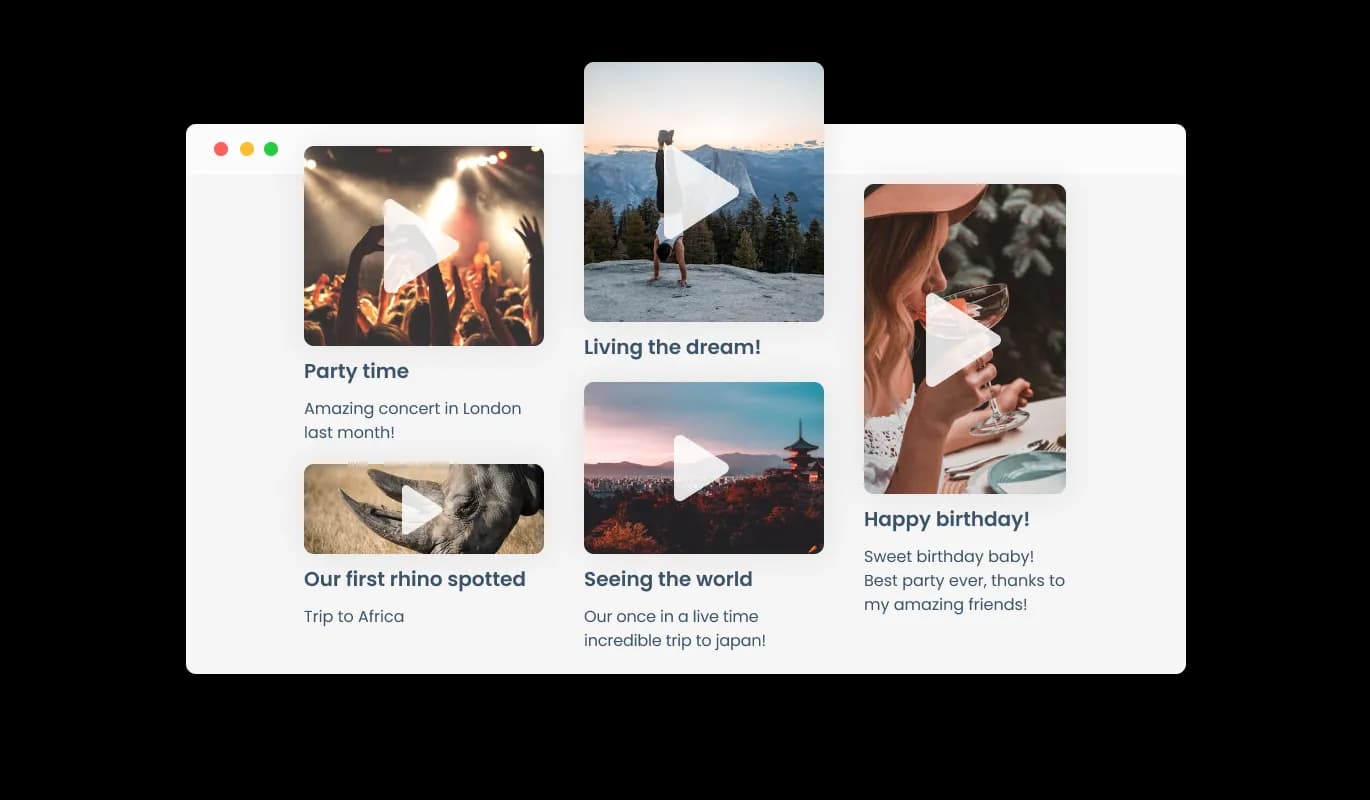
The Video Gallery widget allows adding a title and descriptions under the video to help users understand what they are watching. This feature not only enhances the user experience but also helps with search engine optimization (SEO) by providing relevant text content for search engines to index.
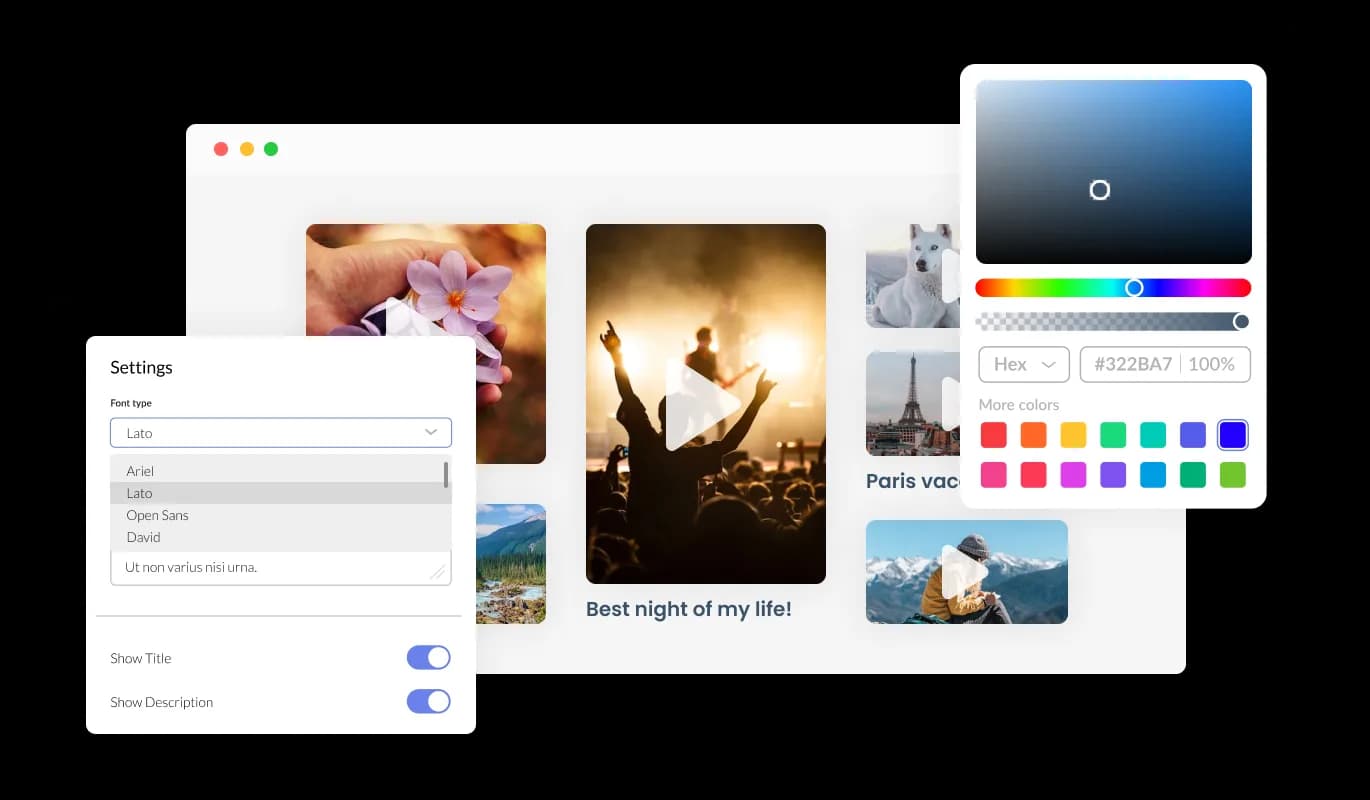
The Video Gallery widget features full customization options so you can edit the design to fit your needs. Change the colors, the fonts, the spacing, and anything else! You can also choose from different font options and adjust the font size, style, and color to create a cohesive and professional look. In addition to these design options, you can customize the spacing to ensure it fits seamlessly into your website layout.

The Video Gallery is a valuable tool for any website. Not only is it fully responsive, meaning it will adjust seamlessly to fit the screen size of any device, but it also has a sleek and modern design that will enhance the overall look of your site. In a world where more and more people are accessing the internet through their phones and tablets, it is crucial to have a website that is optimized for mobile viewing. The Video Gallery widget will allow you to do just that, giving you an edge over competitors.

Our advanced editor is a powerful tool that gives you complete control over the appearance of the Video Gallery widget. With this feature, you can easily customize every aspect of the widget's look and feel, from the colors and fonts to the layout and positioning. But if you're feeling particularly creative, you can take your customization to the next level by editing the CSS directly. This gives you the ability to make even more advanced changes to the widget, allowing you to make it your own. Whether you want to make a few simple tweaks or go all out with advanced customizations, our advanced editor has you covered.

To embed the Video Gallery on your website, simply copy and paste the provided code snippet into the HTML of your webpage. Additionally, the widget is designed to be self-updating, meaning that any changes you make to the Video Gallery editor will be reflected automatically on your website without the need for any additional manual updates.
The Video Gallery widget comes available with different animation options to enhance your video gallery even further. You may provide your audience with an immersive and engaging experience by using the animation elements of the Video Gallery widget.
The Video Gallery widget supports a variety of video hosting platforms, including YouTube, SoundCloud, Facebook, Vimeo, Twitch, Streamable, Wistia, DailyMotion, Mixcloud, Vidyard, and Kaltura. With this level of flexibility, you can easily incorporate videos from multiple sources into your website, ensuring that your visitors have access to a diverse range of content
The Video Gallery widget features the ability to choose whether to play the video inline (on the page, as it is displayed), or in an enlarged popup. This flexibility allows you to customize the viewing experience for your audience, as well as the overall layout of your website.
The Video Gallery widget is easy to use and requires no coding knowledge. Our intuitive dashboard will enable you to customize the widget any way you’d like to with just a few simple clicks. This means that even those with no coding experience can quickly and easily create a professional-looking video gallery that seamlessly integrates with their website, helping to enhance their online presence and engagement with their audience.
Build a video library visitors can actually navigate
Open the editorNo credit card · Setup in under 5 minutes
Common Ninja has amazing no-code widgets that would beautify a website built on any builder. It is very easy to use and customise. It has as many widgets for almost everyone willing to make their website impressive.
Outstanding service. I use their widgets to help me with my web design business and whenever I need help they are very quick to help.
Excellent company with excellent service!!! We used it to build a survey, it was very user friendly. The service was perfect. Amit helped us with every problem and question we had, thank you very much!!!
Common Ninja saved the day when building our website and the customer service Daniel, the co-founder and CEO, provided was amazing.
Yes. The free plan covers one Video Gallery widget with no time limit and no credit card. Upgrade only when you need additional galleries, more videos per gallery, premium skins, advanced layouts, or features like per-video analytics and conditional visibility.
A Video Carousel is a rotating slot: one or a few videos visible at a time, cycling automatically or on swipe, designed for focal-point sections. A Video Gallery is a browsable grid where visitors scan multiple thumbnails and pick what to watch, designed for video libraries. Use this Video Gallery for tutorial libraries, testimonial walls, and portfolio reels; use the Common Ninja Video Carousel widget when one or two videos should rotate in a fixed slot.
YouTube URLs, Vimeo URLs, hosted MP4 files, and Wistia embed URLs. Paste any standard video URL and the gallery handles the thumbnail and player. Mix sources within one gallery: a YouTube product demo, a Vimeo customer story, an MP4 walkthrough, and a Wistia testimonial all coexist in the same widget without separate setup.
Add as many videos as your plan supports: the free plan covers a reasonable number; paid plans lift the cap. Each video has its own title, description, thumbnail, and source. Reorder via drag-and-drop in the editor; the live widget updates without re-paste.
Configurable. Inline player expands the video in place within the gallery, keeping visitors on the page surface. Lightbox modal opens the player in a full-screen overlay for distraction-free viewing, dimming the surrounding page. Pick the playback mode that matches your section: inline for tight sections, lightbox for library pages.
No. Each video renders a lightweight thumbnail JPEG first; the video player loads only when a visitor clicks play. A gallery of 20 videos doesn't preload 20 video iframes: Largest Contentful Paint measures against thumbnails, Cumulative Layout Shift stays stable, and bandwidth costs scale with what visitors actually watch.
Build the widget in the Common Ninja editor (add videos, pick layout, customize design), copy the embed snippet, and paste it into your site: Squarespace via a Code Block in your section; Elementor via the HTML widget on any page or section; Shopify via a Custom HTML section in your theme editor or via a Custom Code app for sitewide injection. Edits in the editor push to every embed without re-paste.
Yes. All layouts (grid, list, masonry, slideshow) adapt across mobile, tablet, and desktop breakpoints. Thumbnails scale to viewport width, the grid reflows to single-column on narrow screens, lightbox modals respect Safe Area insets, and swipe gestures replace mouse-based navigation on touch devices.
Pick your platform. Each takes under 4 minutes.

Showcases videos in a rotating or sliding manner

Showcases images in a rotating or sliding manner

Displays images and captions in diverse layouts and grids, presenting visually appealing arrangements for showcasing multiple images

An audio player compatible with various files and sources

Display the latest posts from your Instagram page

Embed interactive, customizable flipbooks from PDFs on your website.
With the aid of a video gallery widget, website administrators can present a selection of videos from various sources in an aesthetically pleasing and well-organized way. The widget often works with well-known video hostings services like YouTube, Vimeo, and Facebook, among others, and allows users to edit the appearance of their video gallery without knowing any code. Website owners may encourage viewers to interact with their video content, share it on social media, and eventually broaden their online audience by using a Video Gallery Widget.
There are several benefits to adding a Video Gallery to your website:
Including a video gallery on your website can improve its functionality, engage visitors, and eventually increase sales for your company.
Yes, you can. Go to the “Display Rules” tab, and choose your desired triggers. You can learn more about the different triggers & rules here: https://help.commoninja.com/hc/en-us/sections/6900365183517-Display-Rules-Triggers
Yes, you can easily do so from the “Templates” tab.
Yes, there are lots of beautiful skins that you can choose from to save time and start using the widget as quickly as possible.
Yes, you can either upload an image, or select an icon from a large selection of available icons to add to your Notification Bar, or, alternatively, you can leave it all blank.
It’s simple. All you need to do is to sign up and start using the free version.
Common Ninja’s Video Gallery widget is free to use. It is limited to a certain amount of views, however.
Common Ninja’s Video Gallery widget is compatible with ALL current and future website builders
Yes, the Video Gallery widget is GDPR-compliant.
No. Using our Video Gallery widget is very simple. The widget comes with an intuitive drag-and-drop interface and fully customizable options. Once you’ve finished editing the widget to your liking, all you need to do is copy the provided code and add it to your website.
Yes. We are eager to hear your request. Please visit our Feature Request page.
Organize multiple videos into a browsable grid: YouTube, Vimeo, MP4, and Wistia sources, grid / list / masonry / slideshow layouts, inline or lightbox playback, lazy-loaded thumbnails for fast page weight, stylish skins, and Custom CSS. Embed on 200+ platforms including Squarespace, Elementor, Shopify, Framer, WordPress, and Carrd.
Create your Video GalleryNo credit card · Setup in under 5 minutes